What it looks like
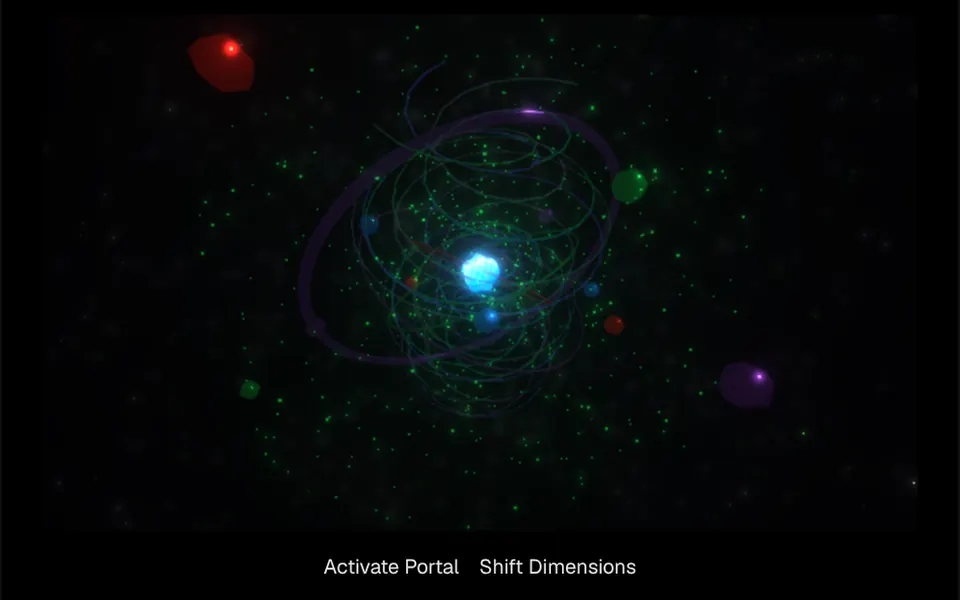
It looks like a sci-fi movie portal floating in deep space. In the center glows a rippling core of light that shifts between purple and blue, surrounded by thin tilted rings, spirals of light rising in a helix and a large purple hoop framing it all. Red, blue, purple and green faceted crystals float around it, among green dust and distant stars, inside a translucent sphere with a green rim. Everything turns slowly and the camera circles on its own; dragging rotates the view and the scroll wheel zooms in or out. Two functions, wired to buttons in the demo, fire a wave of light and pick new colors.
You may be looking for this if you asked for something like
- a glowing 3D portal spinning in the page background
- that sci-fi portal with rings and floating crystals
- a 3D space scene for an event opener
- an AI product background with an energy core in the center
- something like a stargate I can rotate by dragging with the mouse
- a dimensional portal effect with a button to activate it
Also known as
- glowing energy portal
- 3D portal
- dimensional portal
- sci-fi portal
- Three.js portal
- 3D space scene
When to use
- An opener for a tech event, hackathon or conference
- An AI product landing page that wants a striking centerpiece
- A feature or launch page with little text
- Interactive experiences where visitors explore the scene by dragging
When to avoid
- Scrolling page backgrounds, since the wheel over the scene zooms the camera instead of scrolling
- Pages that already run another WebGL effect
- Audiences that browse mostly on old phones
How to ask your AI
Create a Three.js 3D scene of a sci-fi portal for the event opener: a core of light, rings and crystals in my brand colors, a soft glow, scroll wheel zoom turned off, pausing when off screen and a static image for reduced motion.
With THM Componentes, you paste the full prompt from the catalog together with this component's code, and the AI reproduces this exact effect instead of improvising.
Questions about Fronteira
Can Fronteira be the background of a scrolling page?
Yes, with one change. Fronteira uses orbit controls: dragging rotates the camera and the mouse wheel zooms in or out, so over the scene the wheel does not scroll the page. To use it as a background, ask your AI to turn off zoom or all interaction and keep only the auto rotation.
Does Fronteira do anything besides rotating the camera?
Yes. Fronteira exposes two functions you can wire to buttons, as in the demo: activatePortal sends a wave of light from the center through the rings and crystals, with a flash in the core, and shiftDimensions picks new colors from an eight-color palette and rebuilds the scene. The base colors come from the primaryColor, secondaryColor, accentColor and vortexColor props.
Is Fronteira heavy?
It is rated Heavy in THM Componentes. Fronteira uses Three.js with bloom and anti-aliasing post-processing, thousands of particles updated every frame, and it does not pause by itself off screen. The prompt tells your AI to load it on demand, pause it outside the viewport and keep one heavy WebGL effect per page.