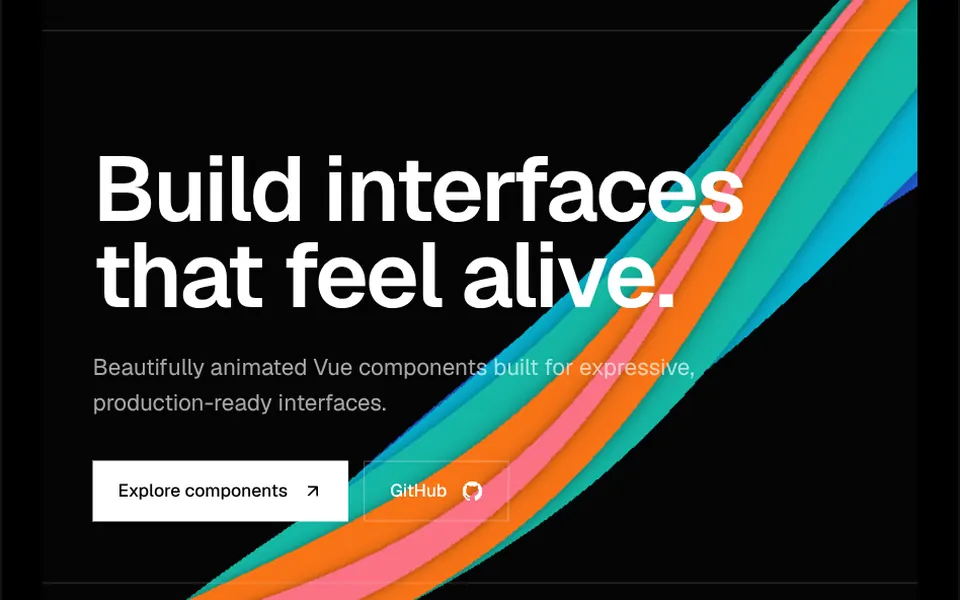
What it looks like
It looks like neon light reflected on water, or colored smoke drifting across the screen. Five thick, blurred waves in sky blue, indigo, purple, fuchsia and cyan cross the area from edge to edge around the middle and keep undulating, each with its own shape, leaving a faint trail as they move. The backdrop is black by default and the waves are semi-transparent, so colors blend where they cross. There are two speeds, slow and fast. By default the section fills the screen height, and your content sits centered on top of the waves.
You may be looking for this if you asked for something like
- colorful waves moving behind the site headline
- a black background with neon stripes waving across the middle
- a light wave effect for a clinic or health app hero
- blurred wavy lines that look like colored smoke
- an animated wave background in blue and purple with a tech feel
- something that feels like moving water at the top of the page
- that neon waves background you see on startup landing pages
Also known as
- blurred wave background
- animated waves
- neon waves
- wave lines background
- flowing waves
- noise waves
When to use
- A hero for brands tied to water, health, wellness or flow
- A SaaS or app header with a blue and purple identity
- An event, podcast or launch opener on a dark background
- A call to action section with a short, centered headline
When to avoid
- Light-themed sites, unless you change the black fill and the neon colors
- Pages with long text in the middle of the screen, where the waves pass behind the letters
How to ask your AI
Create a blurred neon wave background in canvas for my hero: five wavy bands in my brand colors crossing the middle of the screen, slow speed, paused off screen, a static version for reduced motion and good contrast for the headline on top.
With THM Componentes, you paste the full prompt from the catalog together with this component's code, and the AI reproduces this exact effect instead of improvising.
Questions about Maré
How do I change the colors in Maré?
The colors prop of Maré takes a list of colors that the five waves use in sequence, and backgroundFill sets the backdrop, black by default. You can also tune thickness with waveWidth, blur with blur and transparency with waveOpacity. The THM Componentes prompt asks your AI to replace the default blue, purple and fuchsia with your project color tokens.
Does Maré work in Safari and on phones?
Yes. Maré draws on a 2D canvas and already handles Safari, which does not support canvas filters, by applying the blur through CSS instead. The animation runs nonstop, even off screen, and the canvas follows the container size, which fills the screen height by default. The THM Componentes prompt asks for on-demand loading and mobile testing.
Does Maré respect reduced motion settings?
Not on its own: Maré animates the whole time it is on the page. The THM Componentes prompt asks your AI for a static version for people who turn on reduced motion in their system. A still frame of the waves with the same blur keeps the look, and the slow speed makes the motion calmer for everyone.