What it looks like
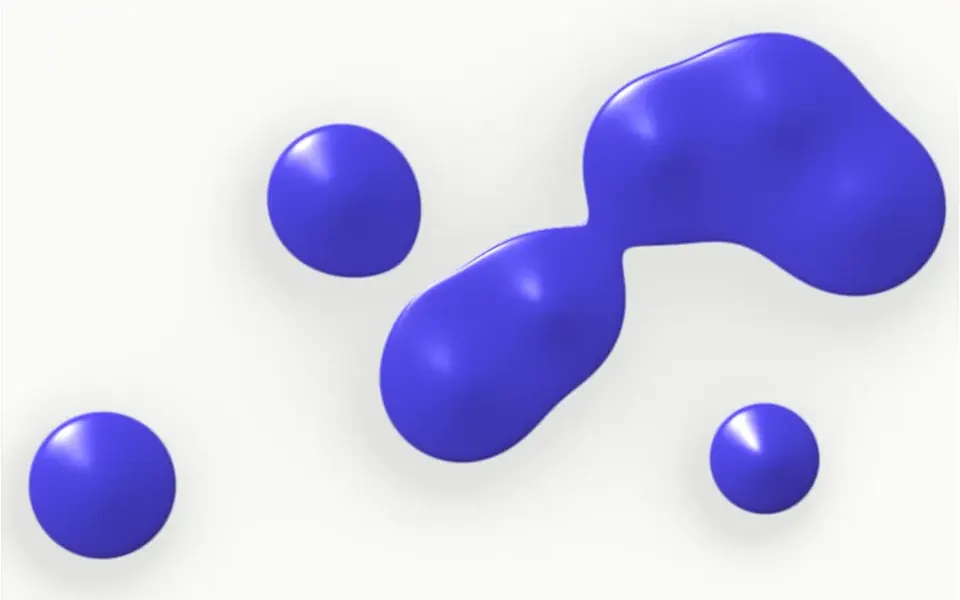
It looks like the blobs in a lava lamp seen from the front. On an off-white background, seven indigo drops drift slowly; when they get close, they stretch a bridge between them and become a single shape, then split again. Each drop has volume, with light from the upper left, a white highlight and a lighter rim, plus a faint shadow on the background. When the mouse moves over it, one more drop appears under the cursor, follows the pointer smoothly and merges with the rest. Your content sits on top.
You may be looking for this if you asked for something like
- blobs that join and split like a lava lamp
- a background with liquid drops that follow the mouse
- a gooey liquid effect for the top of my site
- an organic, playful background for a clinic or wellness brand
- glossy drops merging behind the headline
- something cute and modern for a health app landing page
- little balls that melt together when they touch
Also known as
- liquid drops that merge
- merging blobs
- lava lamp background
- gooey blobs
- liquid blobs background
- blob animation
When to use
- A clinic, health, wellness or nutrition hero with a warm tone
- Playful yet refined brands, such as cosmetics, drinks or kids products
- A highlight section with a short headline and plenty of space
- Welcome or login screens that call for a light touch
When to avoid
- Serious corporate brands, where the playful tone feels off
- Text-heavy areas, since the drops move across the whole space
How to ask your AI
Create a WebGL metaballs background for the hero: liquid drops in my brand color that merge with volume and gloss, an extra drop following the cursor, paused when off screen, a still image for reduced motion and a static fallback in Nuxt.
With THM Componentes, you paste the full prompt from the catalog, which already includes this component's source code, and the AI reproduces this exact effect instead of improvising.
Questions about Orvalho
Is Orvalho heavy on phones?
It is rated Medium in THM Componentes. Orvalho computes the drops in a single shader, caps pixel density at 1.75 and pauses when it leaves the screen. If a phone struggles, lower the number of drops with the count prop, which goes from 1 to 12. The cursor drop depends on a mouse; on touch screens the other drops keep moving.
Can I change the color of the drops in Orvalho?
Yes. Orvalho has one color for the drops and one for the background, and the THM Componentes prompt tells your AI to use your project tokens. You can also adjust size, speed and highlight strength, or turn off the cursor drop with the followMouse prop.
Does Orvalho respect reduced motion settings?
Yes. Orvalho checks the reduced motion preference on every frame: when it is on, the drops hold a fixed position. The cursor drop still follows the pointer, since that movement comes from the visitor. When the effect leaves the screen, it pauses.