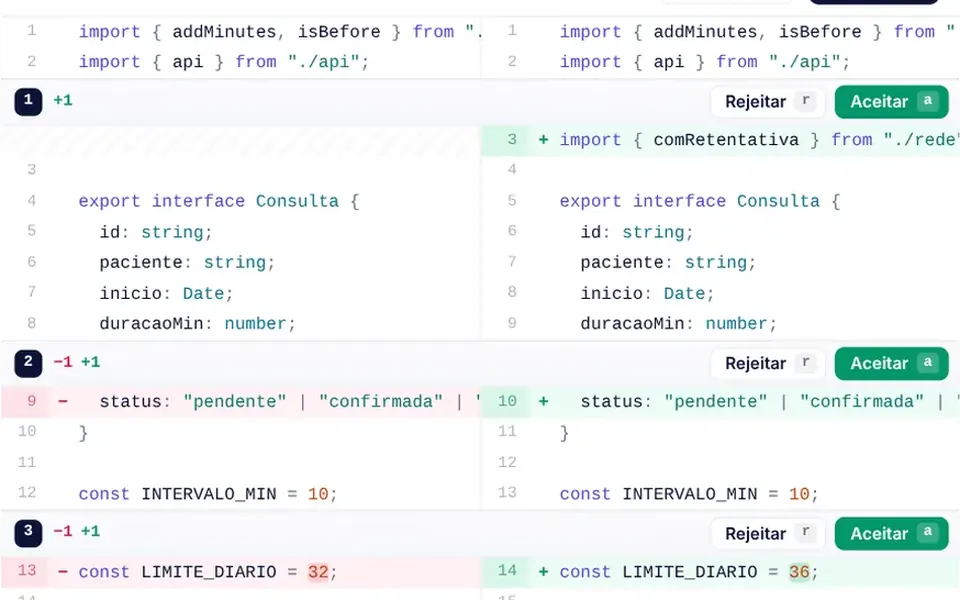
What it looks like
It looks like the code review screen of a repository, set in a white card with rounded corners. The header shows the file, who proposed the change, the count of added and removed lines and a small bar of green and red squares. Removed lines sit on a pink background with a minus sign; new lines sit on light green with a plus sign, and changed words get a stronger tint. Unchanged stretches collapse into a button that reveals them. Every block has accept and reject buttons, and a progress bar counts how many have been reviewed.
You may be looking for this if you asked for something like
- show what the AI changed in the code before I approve it
- compare two versions of a text in red and green
- a GitHub-style change review screen inside my app
- accept or reject each edit the agent suggested
- see the differences between two contracts line by line
- a config version comparison for my dashboard
- highlight only the words that changed between two sentences
Also known as
- diff viewer
- code diff
- side-by-side diff
- unified diff
- code review view
- text compare
When to use
- Approving changes proposed by AI agents before applying them to the project
- Code review in internal tools and technical dashboards
- Comparing versions of contracts, policies and documents with per-section approval
- Versioned configuration history, to see what changed between two dates
When to avoid
- Binary files, images or spreadsheets, which do not compare line by line
- Reviews that need comments on each line, a feature this component does not have
How to ask your AI
Build a review screen that shows the diff between the current code and what the AI agent proposed: side by side or unified, changed words highlighted, accept or reject each block, n and p shortcuts to navigate, unified mode on phones and the final text ready to apply.
With THM Componentes, you paste the full prompt from the catalog, which already includes this component's source code, and the AI reproduces this exact effect instead of improvising.
Questions about Diff Viewer
Does Diff Viewer return the final text after the review?
Yes. After every decision, Diff Viewer emits the resulting text with lists of accepted, rejected and pending blocks, and fires a resolve event once nothing is pending. The pendingAs prop decides whether unreviewed blocks enter the result as the new version or as the original.
Does Diff Viewer work on phones?
Yes. Below 640 pixels wide, Diff Viewer always uses unified mode, in a single column, and hides the shortcut hints to fit the screen. Long lines scroll sideways through a custom scrollbar that you can drag with a finger.
Can I review changes in Diff Viewer with the keyboard?
Yes. In Diff Viewer, n and p move to the next and previous change, a accepts and r rejects the current block and then jump to the next pending one, and u undoes the decision. Arrow keys scroll the code sideways, and every decision is announced to screen readers with the reviewed count.


