What it looks like
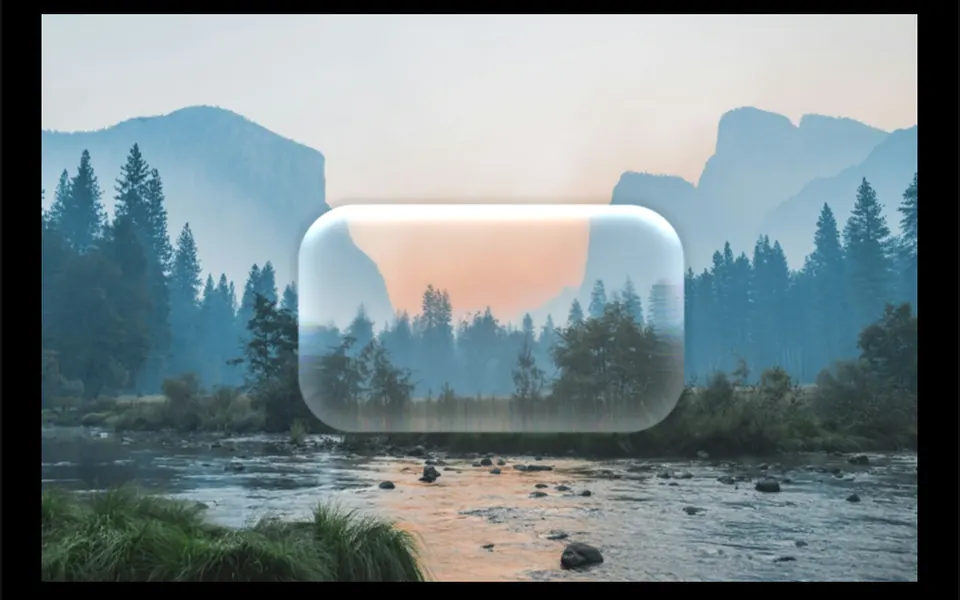
Think of a thick block of glass resting on the page. In the center, whatever sits behind it looks almost sharp; near the rounded edges, the image bends like a lens and splits into red, green and blue fringes. A very light frosted tint and a subtle inner outline shape the piece and follow light or dark mode. The component does not animate on its own: the motion comes from content scrolling underneath. By default the panel is fixed on screen, and the text or buttons you place inside sit on top of the glass.
You may be looking for this if you asked for something like
- that new iPhone glass look for my site's top bar
- a transparent card that warps the background at its edges, Apple style
- a sticky menu that looks like real glass, not just blur
- make my navbar look like thick glass that bends what is behind it
- a glass panel that refracts the image passing behind it
- a nicer glassmorphism effect for my landing page cards
Also known as
- refracting glass panel
- glassmorphism
- glass lens effect
- CSS refraction
- SVG displacement filter
- frosted glass panel
When to use
- A sticky navigation or action bar over photos or colorful content
- Feature cards on landing pages with image-rich backgrounds
- Floating buttons, players and controls that sit over the content
- Interfaces that want to follow Apple's recent visual language
When to avoid
- Flat single-color backgrounds, where the refraction barely shows
- Body text scrolling behind the panel, which gets hard to read at the edges
How to ask your AI
Create a refracting glass panel with an SVG displacement filter for my sticky navigation bar: edges that refract the content behind with a slight color split, a frosted tint in my theme colors and a plain blurred fallback for browsers that do not apply the filter.
With THM Componentes, you paste the full prompt from the catalog together with this component's code, and the AI reproduces this exact effect instead of improvising.
Questions about Escotilha
Does Escotilha work in every browser?
Escotilha applies its SVG filter through backdrop-filter, and support for SVG filters in that property varies between browsers. Test it in Safari and Firefox and prepare a plain blur fallback. The THM Componentes prompt also asks your AI to wrap the component in ClientOnly in Nuxt, with a static version.
Will Escotilha slow down my site?
Escotilha runs no animation and no WebGL: the distortion map is an SVG generated once and rebuilt only when the panel changes size. The cost is the filter applied over the backdrop as the page scrolls, which is why it is rated Medium in THM Componentes. Use it on a few pieces per screen and test on phones.
Can I tune the glass intensity in Escotilha?
Yes. Escotilha has props for corner radius, the width of the refracting edge, distortion scale, the offset of each color channel, blur and the strength of the frosted tint. A scale closer to zero makes the glass subtler; a larger one bends the background more.