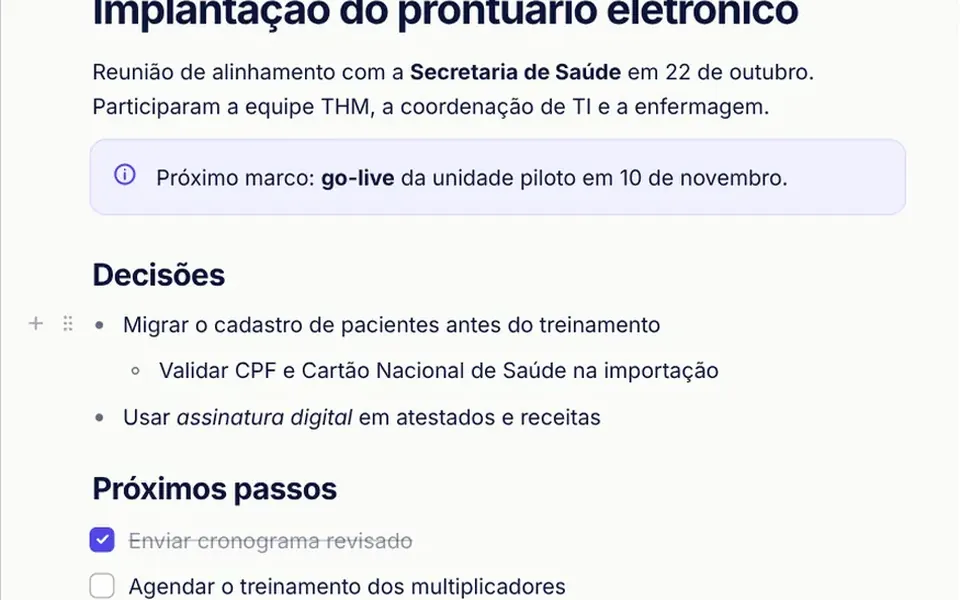
What it looks like
It looks like a clean sheet of paper centered on the screen, under a bar that shows the document title, block and word counts, undo, redo and a Markdown button. Hovering a line reveals a plus sign and a six-dot handle on the left; dragging the handle shows a colored line where the block will land, and on release the blocks slide into their new order. Selecting text opens a small dark toolbar with bold, italic, code and link. Typing a slash opens a searchable list of blocks. Colors come from props: an off-white page, navy text and an indigo accent.
You may be looking for this if you asked for something like
- a Notion-like block editor inside my app
- a rich text field where typing a slash opens a menu of options
- an editor that turns a line into a heading when I start it with a hash
- I want to drag paragraphs around to reorder the text
- somewhere to write meeting notes with checklists inside the dashboard
- a text editor that exports its content as Markdown
- replace a plain textarea with something that feels like a modern app
Also known as
- block-based editor
- Notion-style editor
- rich text editor
- slash command menu
- markdown editor
- WYSIWYG editor
- drag and drop text blocks
When to use
- Meeting notes, reports and ticket descriptions inside an ERP
- Medical records and progress notes that need lists and callouts
- Knowledge bases and internal wikis with headings, checklists and code blocks
- Any rich text field that is a plain textarea today
When to avoid
- Documents that several people edit at the same time and need real-time syncing
- Text that needs tables, embedded images or a print page layout
- Short fields, such as a name or subject, where a simple input is enough
How to ask your AI
Build a Notion-style block editor for the meeting notes screen in my app: a slash menu, markdown shortcuts, a handle to drag blocks, Markdown export, full keyboard navigation, screen reader announcements and my brand colors.
With THM Componentes, you paste the full prompt from the catalog, which already includes this component's source code, and the AI reproduces this exact effect instead of improvising.
Questions about Lauda
Does Lauda store content as HTML?
No. Lauda keeps text as a list of blocks with marked spans, never as loose HTML, so the content comes out sanitized by design. You read and write it through v-model or the toJSON, toMarkdown and fromMarkdown methods, and links using javascript: or data: are rejected.
Can I use Lauda with the keyboard only?
Yes. In Lauda, Ctrl+B, Ctrl+I, Ctrl+E and Ctrl+K format the selection, Ctrl+Shift with the arrow keys moves a block, Tab indents list items, Alt+F10 jumps to the formatting toolbar and Esc moves to the block handle. Conversions, formatting, moves and deletions are announced to screen readers, in Brazilian Portuguese.
Does Lauda work on phones?
Yes. On narrow screens Lauda tightens its margins, hides the plus button and moves the Markdown panel below the text. The drag handle shows on the focused block and works with touch, and the THM Componentes prompt asks your AI to test on mobile and compare LCP and INP.