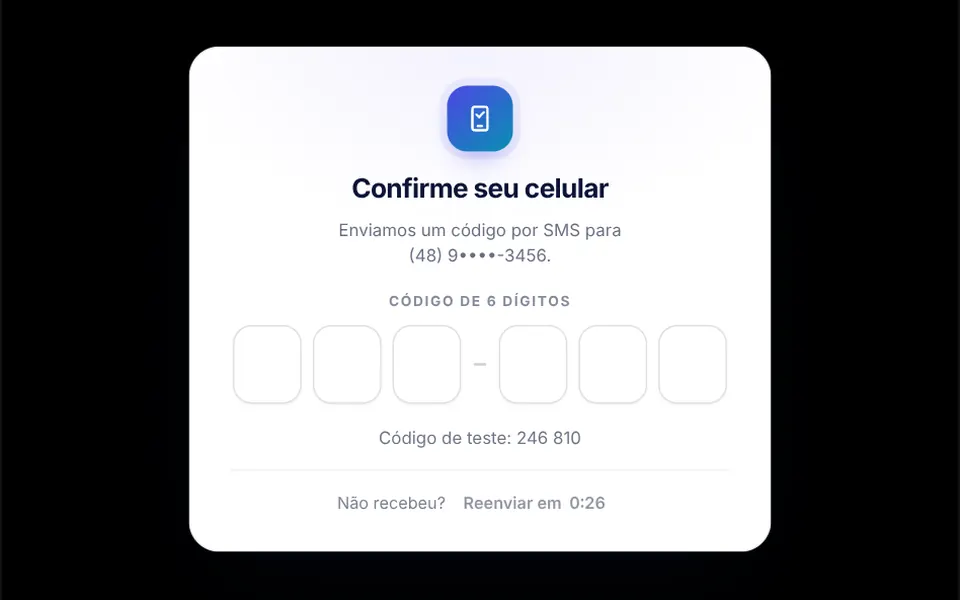
What it looks like
It is a white card with an icon, a heading and six boxes side by side, split by a short dash in the middle. The active box gets a colored border and a blinking caret; each digit rises in slightly and the highlight moves to the next box by itself. While the code is checked, the boxes shimmer in sequence; on success they turn green one by one, and on failure they turn red and the row shakes from side to side. Below, the resend button shows a countdown. The interface text is in Brazilian Portuguese, and the heading and label can be changed through props.
You may be looking for this if you asked for something like
- an input for the code that arrives by SMS
- verification code boxes like banking apps have
- a phone confirmation screen with a 6-digit code
- paste the whole SMS code at once into the field
- a resend code button with a countdown timer
- a PIN field with dots instead of numbers
- passwordless login with a code sent by email
Also known as
- one-time password field
- one-time code input
- verification code input
- PIN input
- 2FA code field
- SMS code input
When to use
- Phone or email confirmation during sign-up
- Passwordless login and two-factor authentication
- A PIN to sign prescriptions, contracts or approve payments
- Security screens in banking, health or fintech apps
When to avoid
- Codes with letters, since the field accepts digits only
- Flows where an email sign-in link removes the need for a code
How to ask your AI
Build the phone confirmation screen with a 6-digit code field split into boxes: a single input with one-time-code autocomplete, pasting the SMS code, auto-advance, error and success states, resend with a countdown and screen reader support.
With THM Componentes, you paste the full prompt from the catalog, which already includes this component's source code, and the AI reproduces this exact effect instead of improvising.
Questions about Cadeado
Does Cadeado fill in the SMS code automatically?
On many phones, yes. Cadeado uses a real field with one-time-code autocomplete, which lets the system suggest the code received by SMS, and it accepts pasting a whole sentence, keeping only the code digits. On Chrome for Android, the webOtp prop can also read the SMS through the WebOTP API.
How do I connect Cadeado to my verification API?
Pass an async function to the verify prop: Cadeado calls it when the code is complete, shows the verifying state and handles the result, where true confirms and a string becomes the error message. The complete, verified, rejected and resend events notify your code, and v-model holds digits only.
Is Cadeado accessible?
Yes. Cadeado exposes a single labeled and described field that screen readers read like any input, announces verification, errors and resends in a live region, and supports arrows, Home, End and Enter. With reduced motion turned on, the shake and the digit animations are switched off.