What it looks like
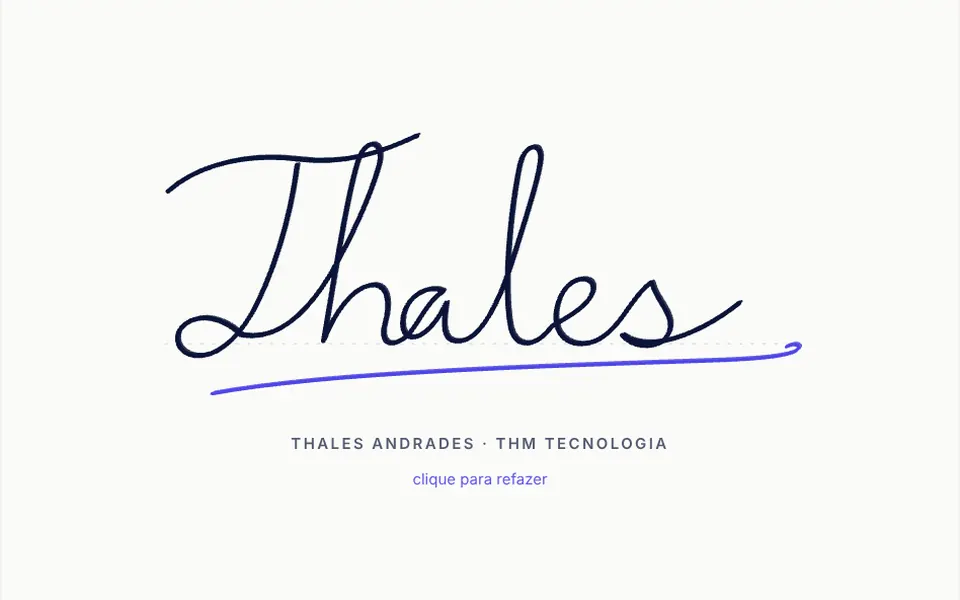
It looks like the signature line on a paper contract. On a white card, a wide area with a faint dot pattern shows an X, a baseline and, under it, the signer's name and the date and time. While empty, it shows a short hint with a pen icon. The ink is navy blue, thin on fast movements and thicker on slow ones, with smooth curves like a real pen. Above, a toggle switches between drawing and typing the name in a cursive font; the footer holds undo, clear and the PNG and SVG buttons.
You may be looking for this if you asked for something like
- let people sign with their finger on the phone screen
- a signature field for a consent form
- collect a customer signature on a contract on my site
- a box to sign with the mouse and save as an image
- a typed cursive signature for people who cannot draw
- sign a telehealth consent form in the browser
- save the signature as PNG or SVG to attach to a PDF
Also known as
- signature pad
- signature field
- signature canvas
- draw signature
- sign on screen
- handwritten signature input
When to use
- Consent forms for telehealth and healthcare visits
- Contracts, proposals and work orders signed in the browser
- Signed acceptance in sign-ups and delivery receipts
- Displaying saved signatures in read-only mode
When to avoid
- Documents that legally require a certificate-based digital signature, since the pad records a drawing
- Flows where a simple acceptance checkbox is enough
How to ask your AI
Add a signature pad to the consent form: variable-width strokes for finger, stylus and mouse, undo and clear, a baseline with name and date, PNG and SVG export, a typed name option and my brand colors.
With THM Componentes, you paste the full prompt from the catalog, which already includes this component's source code, and the AI reproduces this exact effect instead of improvising.
Questions about Tabelião
Does Tabelião work with a finger on phones?
Yes. Tabelião uses Pointer Events and blocks scrolling over the signing area, so the finger draws without dragging the page. With a stylus, it reads real pressure and ignores a palm resting on the screen. On small screens, the undo and clear buttons shrink to icons.
How do I save the signature from Tabelião?
In three ways. Tabelião downloads PNG or SVG from its buttons, exposes toPNG and toSVG methods with optional trimming, scale, background and baseline, and provides the normalized strokes through v-model, which you can store and display again later, including in read-only mode.
Does Tabelião offer an option for people who cannot draw?
Yes. Tabelião has a typing mode: people type their name and choose one of three cursive styles from the system fonts. The signature area takes keyboard focus, describes its content to screen readers and supports Ctrl+Z to undo.