What it looks like
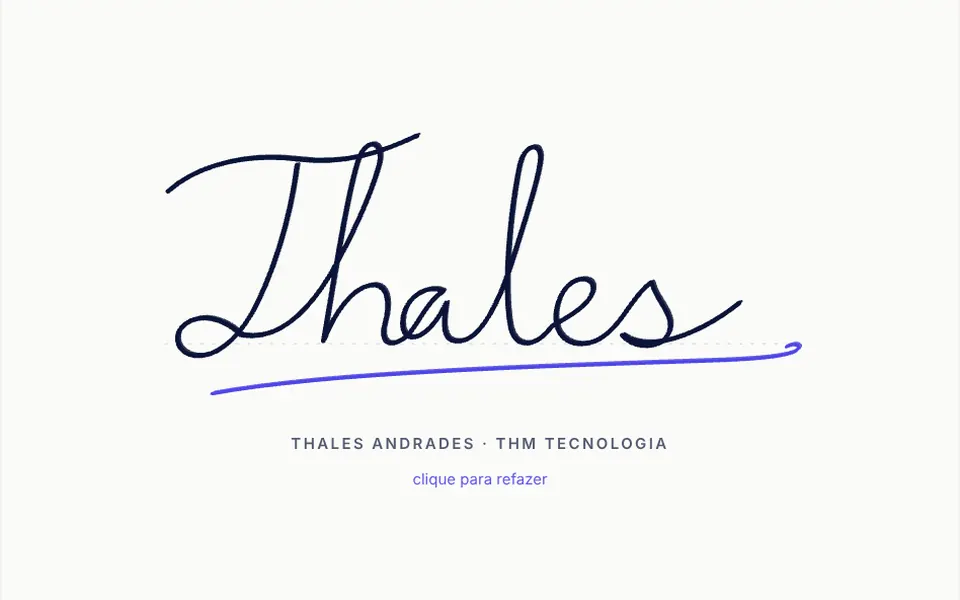
It looks like someone signing a document in front of you with a fountain pen. A faint dotted baseline appears and the signature starts to emerge in navy ink: first the stem of the initial letter with a loop, then a wavy crossbar, the rest of the name in one continuous line and, last, an underline flourish in indigo. Each stroke takes as long as its length, with short pauses between strokes, and a second thin offset line imitates a broad, slanted nib. The whole drawing takes a little over three seconds and starts when the signature appears on screen. A small uppercase caption sits below.
You may be looking for this if you asked for something like
- a signature that draws itself at the end of the letter on my site
- a handwritten signature animation for the founder page
- a pen writing a name on the screen
- the CEO signature appearing stroke by stroke on the proposal
- that cursive writing effect where the text is written live
- an elegant animated signature to close the about section
- a handwritten name that draws itself when people scroll to it
Also known as
- signature animation
- handwriting animation
- animated signature
- SVG line drawing
- stroke drawing animation
- self-drawing signature
When to use
- Closing a founder letter or a company message
- An about page with the signature of the person in charge
- Online business proposals and presentations with a personal tone
- Thank-you pages, invitations and welcome messages
When to avoid
- When the signature has legal value: this is only a decorative animation
- When visitors need to sign, where a signature pad makes more sense
- Pages that show the signature many times, where the repeated animation gets tiring
How to ask your AI
Create a handwritten signature animation in SVG for the end of the founder letter: strokes draw in writing order with stroke-dashoffset, timed in proportion to each stroke's length, replay on click or Enter, and the full signature shown still for reduced motion.
With THM Componentes, you paste the full prompt from the catalog, which already includes this component's source code, and the AI reproduces this exact effect instead of improvising.
Questions about Rubrica
Can I use my own signature with Rubrica?
Yes, with one change. Rubrica ships with a sample signature hand-drawn as SVG paths. To use yours, replace those paths with strokes traced from your own signature, in the order your hand makes them; each stroke's timing adapts to its length on its own. Colors, stroke width, duration and the caption are props.
Does Rubrica work with a keyboard and screen readers?
Yes. Rubrica is a native button: it takes focus with Tab, shows a visible focus outline and replays the drawing with Enter or Space. The strokes are hidden from screen readers, which hear the button label instead; that label and the hover hint are written in the component, so adjust them to your language and to the signer's name.
Does Rubrica respect reduced motion settings?
Yes. When the system asks for less motion, Rubrica shows the complete signature at once, without animating the strokes. Otherwise the drawing runs only once, the first time it appears on screen, and replays only when someone clicks, taps or presses Enter.