What it looks like
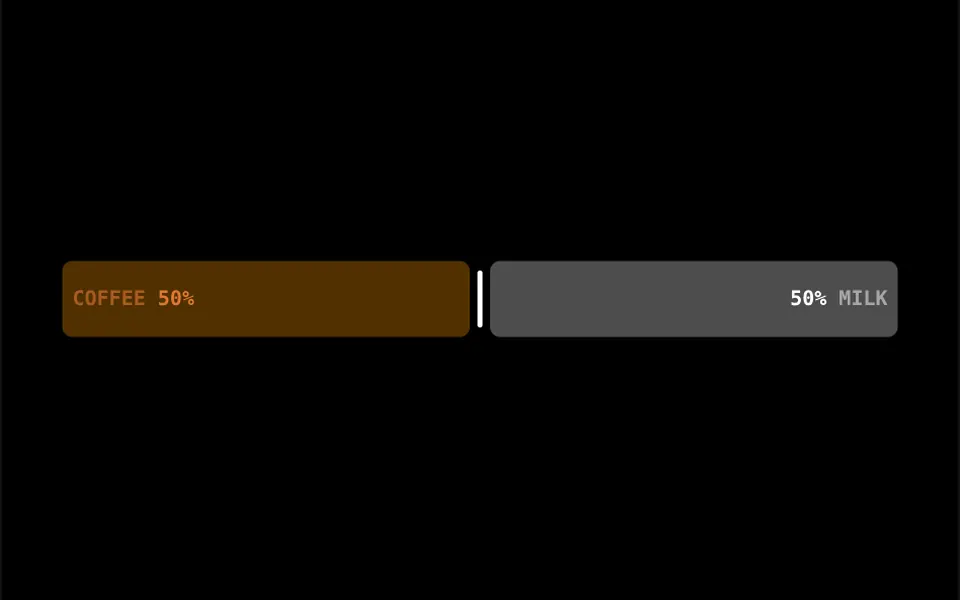
Imagine a cup where you choose how much is coffee and how much is milk. The bar splits into two parts, with a small gap and a thin line at the split point: translucent orange on the left, translucent white on the right. Bold monospaced labels show each side's name and percentage, such as 50% and 50%. When the split is near the middle, the labels sit inside the bars, which fill the full height; near the ends, the bars shrink downward and the labels rise above them with a small bounce. The center line gets brighter on hover or focus.
You may be looking for this if you asked for something like
- a bar to choose the ratio between two things
- a slider that shows each side's percentage, like 70 and 30
- a control to split a budget between two options
- pick how much coffee and how much milk, but on a website
- a preference slider between two extremes in a survey
- a nice-looking slider for an investment simulator
Also known as
- proportion slider
- split slider
- ratio slider
- range slider
- percentage slider
- dual value slider
When to use
- Ratio simulators, such as fixed and variable income or work and leisure
- Budgets and spending splits between two categories
- Preference surveys between two extremes
- Product configurators that mix two ingredients or flavors
When to avoid
- Choices with more than two parts, which need another control
- Forms that need the value, unless your AI adds a v-model, since the original does not emit the number
How to ask your AI
Create a slider that splits a ratio between two options in my simulator: a bar in my brand colors, labels with each side's percentage, a v-model with the value, an accessible label for screen readers and a non-animated version for reduced motion.
With THM Componentes, you paste the full prompt from the catalog together with this component's code, and the AI reproduces this exact effect instead of improvising.
Questions about Pingado
How do I read the chosen value from Pingado?
In the original, Pingado keeps the value internally and emits no events. To use the number in a calculation or form, ask your AI to expose a v-model or a change event; the value goes from 0 to 100, and the right side is always 100 minus that number.
Does Pingado work with a keyboard and on phones?
Yes. Under the visuals, Pingado is an invisible native range input that responds to arrow keys and finger dragging. The labels are hidden from screen readers, so give the input an accessible name; the THM Componentes prompt asks for testing on mobile.
Can I change the texts and colors in Pingado?
Yes. Pingado takes its texts through the leftContent and rightContent props, LEFT and RIGHT by default and COFFEE and MILK in the demo, and hex colors through leftColor, rightColor and indicatorColor. The prompt tells your AI to replace the fixed colors with your project tokens.