What it looks like
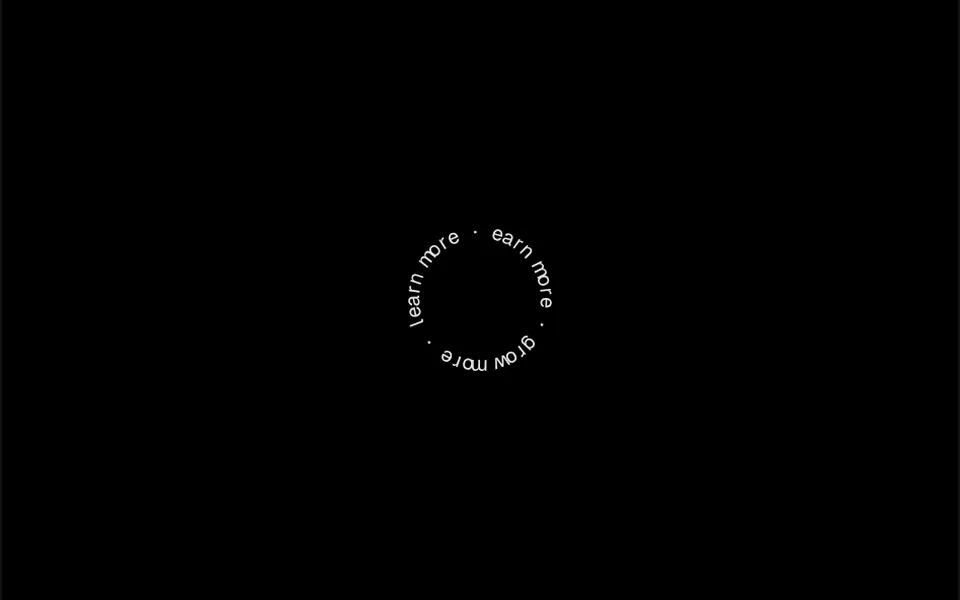
It looks like one of those round label seals with a phrase written along the edge, except it spins. The letters are spaced evenly around a circle, each with its top facing outward, and an extra space separates the end of the phrase from the start. By default the ring completes a turn every ten seconds at a steady pace, with no easing, and it can spin the other way. The radius is measured in characters, so the circle grows with the font size. The center of the ring stays empty, free for an icon or an arrow you place there.
You may be looking for this if you asked for something like
- text spinning around a circle next to the button
- a round badge that keeps rotating with words around the edge
- that rotating 'scroll down' stamp you see on agency sites
- a phrase going around in a circle over the product photo
- a rotating badge with the brand name around the logo
- circular words turning slowly to add motion to the hero
Also known as
- spinning badge
- circular text
- rotating text badge
- text on a circle
- circular text animation
- rotating stamp
When to use
- A badge next to a call to action, such as 'scroll to see' or 'learn more'
- A detail around a logo, an avatar or a product photo
- Portfolios and agency sites that call for an editorial touch
- Launch banners with a short repeated phrase
When to avoid
- Long phrases, which squeeze the letters together and make them hard to read
- Important information, since text moving in a circle takes effort to read
How to ask your AI
Create a rotating circular text badge next to the main button on the page: the phrase around a circle, slow continuous rotation, my brand colors, an accessible label with the full phrase and a still version for people who prefer reduced motion.
With THM Componentes, you paste the full prompt from the catalog together with this component's code, and the AI reproduces this exact effect instead of improvising.
Questions about Roseta
How do I make Roseta faster, slower or spin in reverse?
Roseta has a duration prop that sets how many seconds the ring takes to complete a turn, ten by default, and a reverse prop that flips the direction. You can also change the radius, measured in characters, to open or close the circle to fit the phrase.
Can screen readers read the phrase in Roseta?
In Roseta's original code, each letter is a separate element and there is no label with the full phrase, so some screen readers may spell it out. It is worth asking your AI for an aria-label with the complete text and marking the letters as decorative.
Can I put an icon in the middle of Roseta?
Yes, with a small layout tweak. Roseta draws only the ring of letters and leaves the center empty; to show an arrow, a logo or a photo in the middle, ask your AI to place that element at the same center point as the ring.