What it looks like
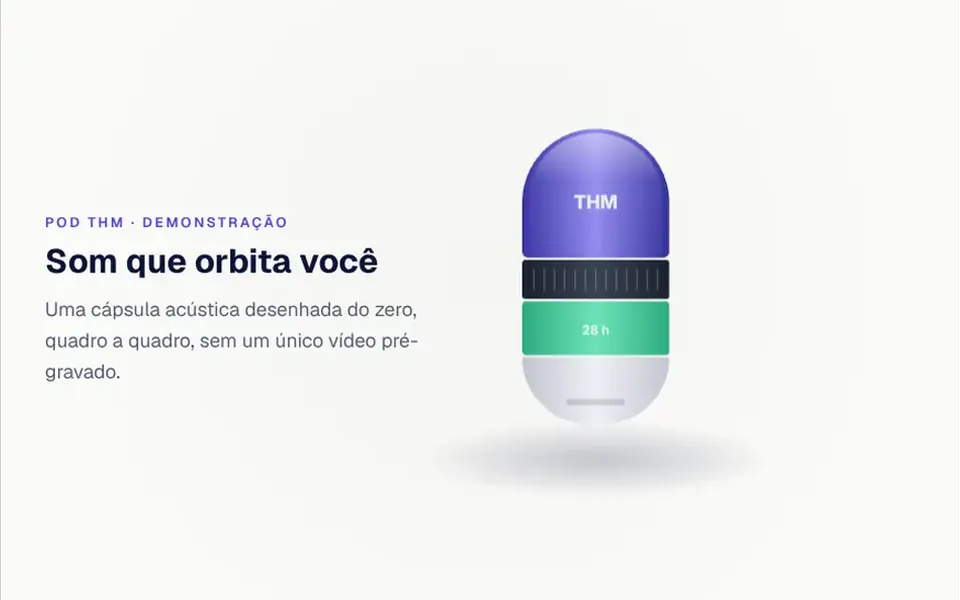
It recalls a wireless earbuds launch page. On wide screens, an elongated capsule sits on the right, with a top in the brand color, a dark band with a speaker grille, a green band and a silver tip, spinning over a soft floor shadow while a highlight runs across its surface. As you scroll it settles, its four parts drift apart in the air and thin lines point to each one with its name; then everything clicks back into place. On the left, four text blocks with a label, title and short sentence fade in and out in stages, and motion follows the scroll with light inertia.
You may be looking for this if you asked for something like
- that Apple-site effect where the product spins while you scroll
- show my product coming apart into pieces as people scroll down
- an AirPods-style launch animation without recording a video
- a section that explains each product part with little pointer lines
- a spinning product with text that changes at each scroll step
- a product page that feels like a high-end launch
Also known as
- scroll video
- exploded view
- scroll sequence
- scroll-driven product animation
- product launch animation
- product scrollytelling
When to use
- A launch page for a physical or hardware product
- A section that explains the layers of a service or technology
- Engineering storytelling that shows each part and what it does
- A product presentation at an event or pitch, driven by scrolling
When to avoid
- When the real product must appear: the default drawing is a generic audio capsule, and changing it means adapting the code
- Pages where people need to reach price and checkout fast, without going through a long scroll sequence
How to ask your AI
Create a launch section in the style of a wireless earbuds page: a product drawn in Canvas spins and comes apart as I scroll, with text in stages, labels pointing at the parts, my brand colors, a pause when off screen and static poses for people who prefer reduced motion.
With THM Componentes, you paste the full prompt from the catalog, which already includes this component's source code, and the AI reproduces this exact effect instead of improvising.
Questions about Maquete
Does Maquete need a video or an image sequence?
No. Maquete draws every frame in Canvas 2D from the scroll progress, with light, shadow and reflection computed on the fly, so there is no heavy file to download, and drawing stops when the section leaves the screen. The trade-off is that the product is a generic audio capsule; to show another one, ask your AI to adapt the drawing.
Can I change the texts and colors of Maquete?
Colors, yes: Maquete takes props for the shell, text and background colors, plus the brand engraved on the product, and the THM Componentes prompt tells your AI to use your project tokens. The four text steps and the part labels live in a list inside the component, so ask your AI to replace them with yours.
Does Maquete respect reduced motion settings?
Yes. With reduced motion on, Maquete does not animate: it shows three static poses side by side, from assembled to taken apart and back, with the text steps listed below. In Nuxt, the THM Componentes prompt asks your AI to wrap the component in ClientOnly with a fallback image or color and to load it on demand.