What it looks like
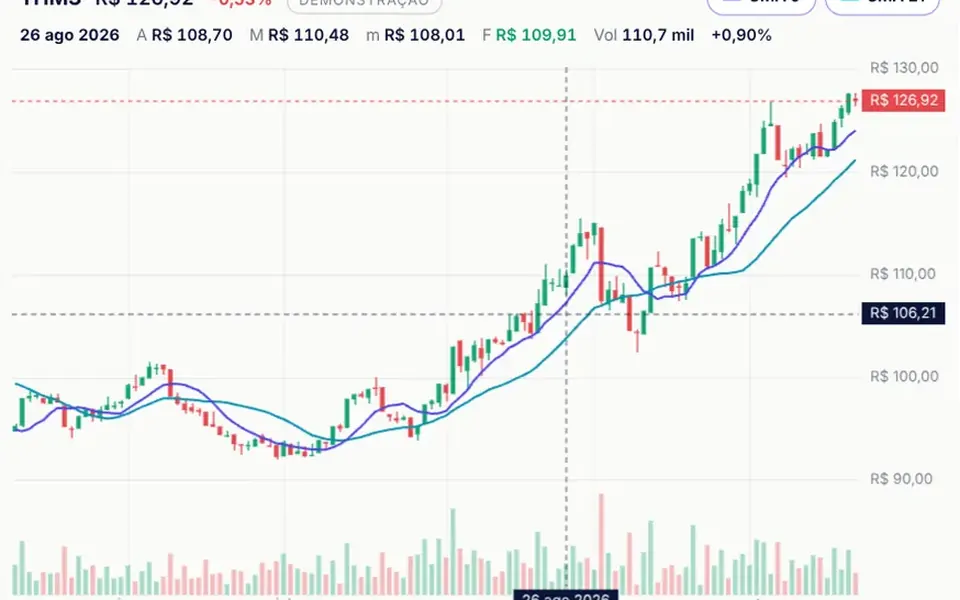
It looks like the monitor in an operations room. Two curves, one indigo and one cyan, run over a light grid with a soft gradient underneath. When the chart enters the screen, the lines draw themselves from left to right. Then a new point arrives every 1.5 seconds: the chart slides left, the scale adjusts smoothly and a halo pulses on the latest point. A live badge with a pulsing dot sits next to the title, and the legend shows each series' current value. With the mouse or a finger, a vertical line marks the moment and a white card shows the time and values.
You may be looking for this if you asked for something like
- a chart that keeps updating by itself in real time
- show how many users are online right now on a dashboard
- a line that scrolls sideways as new data comes in
- a monitoring chart like an operations room screen
- a nice smooth area chart for my dashboard
- track site traffic minute by minute
Also known as
- real-time chart
- streaming chart
- live line chart
- area chart
- monitoring chart
When to use
- A monitoring dashboard for platforms, servers or queues
- A support center tracking open tickets or live conversations
- A status page or public metrics page with real-time traffic
- A static chart of daily or monthly series, with live mode turned off
When to avoid
- More than two series in one chart, since the component draws at most two
- Reading pages where constantly moving data pulls attention away from the text
- English-only products, unless your AI translates the built-in Portuguese badge, labels and dates
How to ask your AI
Build a live SVG area chart for the monitoring dashboard, with a monotone curve, a new point every few seconds from my API and a smoothly sliding axis. I want a crosshair tooltip, pausing when off screen and a no-animation version for reduced motion.
With THM Componentes, you paste the full prompt from the catalog, which already includes this component's source code, and the AI reproduces this exact effect instead of improvising.
Questions about Sismógrafo
How do I connect real data to Sismógrafo?
Pass a function in the feed prop that receives the latest values and returns the new ones, even asynchronously; Sismógrafo calls it on every interval. You can also push points with the push method through a ref, or turn live mode off and pass series with values and dates.
Is Sismógrafo heavy on the browser?
Not much. Sismógrafo is SVG with no dependencies, rated Light in THM Componentes, and it only animates while something is changing. Off screen it stops asking for new points and stops redrawing, then resumes when the person scrolls back to it.
Does Sismógrafo respect reduced motion settings?
Yes. With reduced motion on, Sismógrafo appears already drawn, new points arrive without the sliding axis, the scale changes without transition, the badge dot stops pulsing and the halo on the latest point is hidden. The data keeps updating as usual.