What it looks like
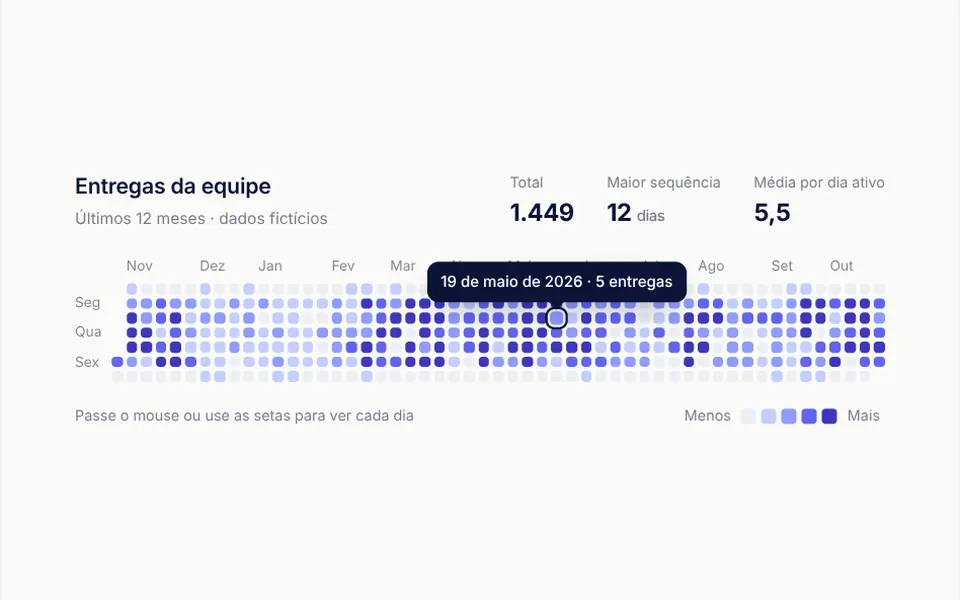
It looks like the contribution grid on a developer profile: columns of weeks, rows of days, months along the top and Monday, Wednesday and Friday on the left. Days with no activity are a very light gray; the rest go from lavender blue to deep indigo depending on volume. When the map enters the screen, the squares appear one by one, growing from the center, in a wave that runs from the oldest week to the newest. On hover, the day grows slightly, gets an outline and shows the date and the count. On narrow screens the grid scrolls sideways and starts at the most recent days.
You may be looking for this if you asked for something like
- that GitHub-style grid of squares to show activity
- a calendar that colors the busiest days darker
- show how many tickets the team handled each day of the year
- a daily heatmap for the company dashboard
- a whole-year grid with one square for each day
- see how often people log in across the months
Also known as
- calendar heatmap
- contribution graph
- yearly activity calendar
- daily activity grid
- streak calendar
When to use
- A team dashboard that tracks deliveries, tickets or support calls per day
- A user profile that shows consistency in usage, study or workouts
- An annual report that needs to reveal seasonality and strong weeks
- A SaaS metrics area with daily visits or events
When to avoid
- Data with only a few recorded days, which leaves the grid almost empty
- Comparing exact values between days, since colors group values into bands
- Dark or English-only sites, unless your AI adapts the default navy text and the built-in Portuguese labels
How to ask your AI
Build a calendar-style activity heatmap with one square per day over the last 12 months for the support dashboard. Use my brand color ramp, a tooltip with the full date, arrow key navigation and a reveal animation that respects reduced motion.
With THM Componentes, you paste the full prompt from the catalog, which already includes this component's source code, and the AI reproduces this exact effect instead of improvising.
Questions about Caderneta
How do I connect my data to Caderneta?
Pass the data prop as a list of objects with a YYYY-MM-DD date and a value, or as a map from date to number; values on the same day are added up. Without data, Caderneta shows seeded sample values. The unit and unitPlural props change the word used in the tooltip.
Does Caderneta work with a keyboard and screen readers?
Yes. Caderneta's grid takes focus and the arrow keys move through the days, with Home and End for the ends and Esc to close the tooltip. Screen readers get a summary with the total, longest streak and busiest day, a hidden table of monthly totals and announcements for the focused day.
Does Caderneta respect reduced motion settings?
Yes. With reduced motion turned on, Caderneta shows every day at once, with no wave reveal and no transitions. Otherwise the reveal only starts when a quarter of the map is on screen, and it does not replay on every scroll.