What it looks like
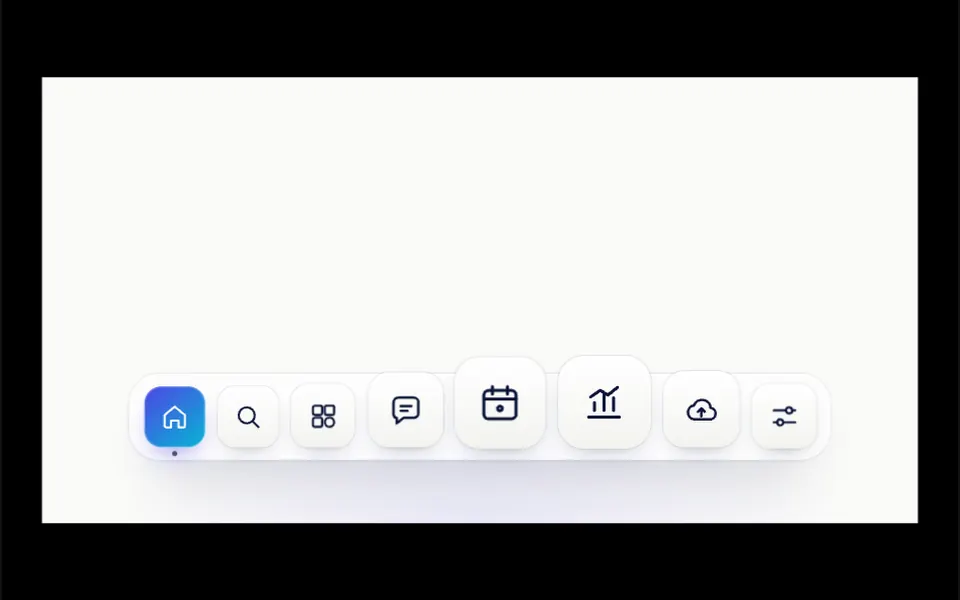
Think of the Mac dock with a touch of magnetism. A light, rounded frosted glass bar floats near the bottom of the area with eight thin-line icons inside white squares. As the cursor approaches, neighboring icons grow along a smooth curve, the one in the middle reaching almost twice its size, and the icon under the pointer shifts toward it as if attracted. Everything settles on springs, with no jolts. The active icon turns into an indigo to cyan gradient with a small dot below, and it gives a little hop when clicked. A dark label appears above the focused icon.
You may be looking for this if you asked for something like
- a menu with icons that grow when I hover, like the Mac dock
- a floating bar at the bottom of the screen with my app shortcuts
- icons that seem attracted to the cursor, like magnets
- a nice dock for my dashboard navigation
- that Apple effect where an icon gets bigger near the mouse
- a springy navigation menu that makes people want to click
- an icon bar that shows each name above the icon on hover
Also known as
- macOS dock
- icons that grow on hover
- dock magnification
- magnetic hover
- floating dock
- magnet effect
- floating navigation bar
When to use
- Main navigation for a web app or dashboard with a few sections
- A floating menu on a landing page or portfolio
- A toolbar for an editor, board or creative tool
- Fixed shortcuts at the bottom of the screen in product demos
When to avoid
- Menus with many items or long labels that need text always visible
- Main navigation on mobile-first sites, where there is no cursor to magnify the icons
How to ask your AI
Create a macOS-style dock with a magnet effect at the bottom of my dashboard: icons that magnify with cursor distance and get pulled toward it, spring animation, labels on hover, arrow key navigation and no animation for people who prefer reduced motion.
With THM Componentes, you paste the full prompt from the catalog, which already includes this component's source code, and the AI reproduces this exact effect instead of improvising.
Questions about Bússola
Does Bússola work on phones?
Yes, as a button bar. Distance magnification and the magnet pull in Bússola depend on a cursor, so on phones tapping an icon simply activates the item, which gets the gradient highlight and the small hop. The THM Componentes prompt asks your AI to test on mobile and compare LCP and INP.
Can I change the icons and colors of Bússola?
Yes. Each Bússola item has a label and an icon picked from eight SVG drawings that ship with the component: home, search, projects, messages, calendar, metrics, cloud and settings. For other icons, ask your AI to add new paths. Accent, icon and background colors are props, and the THM Componentes prompt says to use your project tokens.
Does Bússola support keyboard use and reduced motion?
Yes. Bússola is a toolbar with a single tab stop: Tab enters it, arrows, Home and End move between icons, and Enter or Space activate, with magnification and the label following focus. With reduced motion on, icons resize without springs, without the magnet pull and without the hop on click.