What it looks like
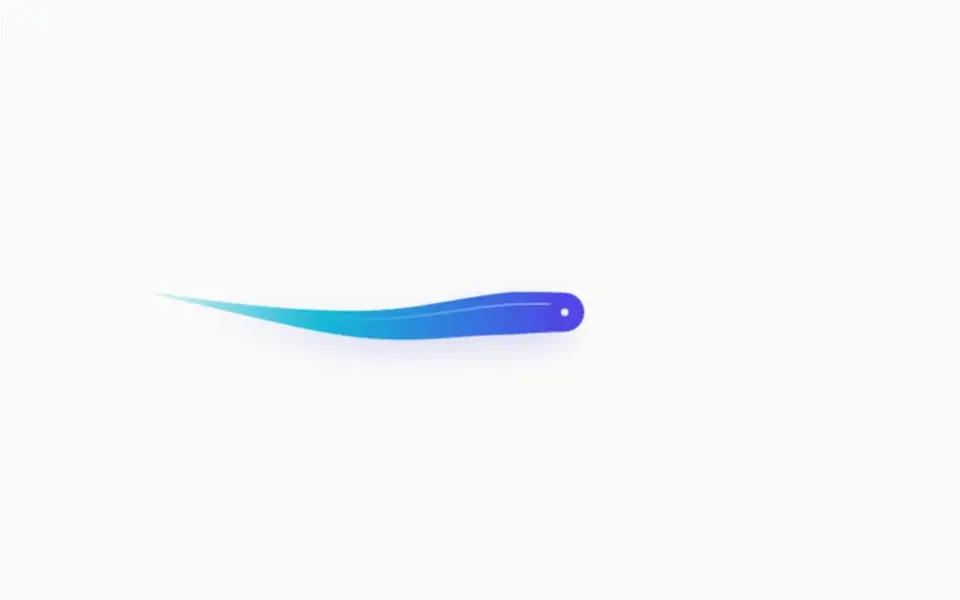
It looks like a rhythmic gymnastics ribbon in the air, or a paper snake following a hand. On a near-white background, a band up to 34 pixels wide at the head tapers until it vanishes at the tail, from indigo to cyan, with a soft colored shadow and a thin sheen along its back. The round head has a bright dot in the middle. It runs after the mouse with a slight delay, and the body follows in smooth curves instead of sharp bends. When the pointer stays still for 1.6 seconds or leaves the area, the ribbon starts tracing a sideways figure eight and ripples gently.
You may be looking for this if you asked for something like
- a colorful snake that follows the mouse on screen
- a thick, stretchy trail behind the cursor
- a gymnastics ribbon effect following the mouse at the top of the site
- something interactive and minimal for the contact page
- a gradient line that chases the pointer with a spring feel
- a background that invites people to move their mouse
- that snake that keeps moving on its own when nobody touches it
Also known as
- stretchy cursor ribbon
- cursor trail
- snake cursor
- ribbon trail
- spring follow effect
- mouse follower
When to use
- A minimal hero with a short headline, where motion is the invitation
- A contact or thank-you page that calls for a playful touch
- A featured area in a portfolio or creative studio site
When to avoid
- Reading areas and forms, where the moving ribbon competes for attention
- Sites visited almost only on phones: without a mouse, it relies on idle mode
How to ask your AI
Create a Canvas 2D elastic ribbon in the hero that chases the cursor with spring lag, thick at the head and tapering to the tail, in my brand colors, with an idle mode that draws a figure eight, a pause when off screen and a static pose for reduced motion.
With THM Componentes, you paste the full prompt from the catalog, which already includes this component's source code, and the AI reproduces this exact effect instead of improvising.
Questions about Enguia
Does Enguia work on phones?
Enguia follows the mouse pointer; on touch screens, what people actually see is the idle mode, where the ribbon draws a figure eight and ripples on its own. So it stays alive on phones, but the full interaction happens on desktop. The physics is simple and runs on Canvas 2D.
Will Enguia hurt performance?
Barely. Enguia is rated Light in THM Componentes: 44 nodes are simulated and drawn on a single canvas, with no WebGL and no dependencies, and resolution is capped at 2x on dense screens. The animation pauses when the component leaves the screen, so it costs almost nothing while people read other sections.
Does Enguia respect reduced motion settings?
Yes. With reduced motion turned on, Enguia does not animate: it draws the ribbon once, standing still as an S shape across the area, with the same colors and sheen. The section keeps its look without any continuous animation.