What it looks like
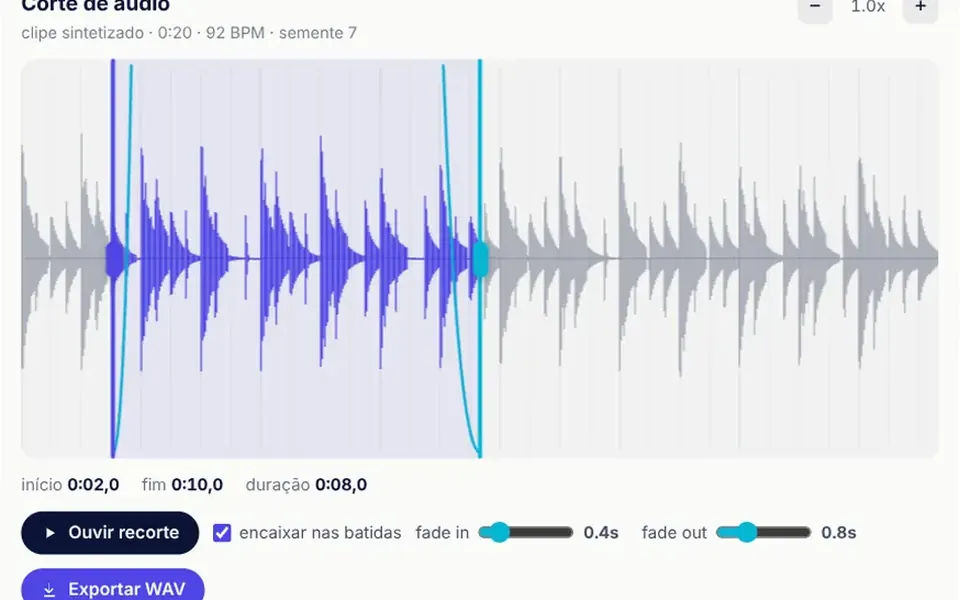
It looks like the trim screen of a recording app. On a light card, the waveform fills the center, with thin lines marking the beats; the selected section turns indigo and the rest stays gray. Two handles, one indigo and one cyan, mark the start and end and snap to the nearest beat. Cyan curves show the fades. Below sit the start, end and duration readouts, the play button, which sends a line across the section, the fade controls and the export button. The mouse wheel zooms the waveform, and dragging outside the handles pans the view.
You may be looking for this if you asked for something like
- an editor so users can cut a piece of audio inside my app
- pick part of a song by dragging two markers on the waveform
- a tool to trim a jingle and download the file
- cut a podcast preview without sending the file to a server
- an audio trim screen with fade in and fade out
- that sound wave with handles to mark the start and end
Also known as
- waveform trimmer
- audio cutter
- waveform editor
- audio clip editor
- WAV export
- trim audio UI
When to use
- Products that let people trim jingles, ringtones or audio replies
- Podcast platforms that create short episode previews
- Internal tools that cut clips without relying on a media server
- Prototypes or demos of audio features in a SaaS
When to avoid
- Multitrack editing, effects or mixing, which call for a full editor
- Long recordings without adaptation: the catalog clip runs from 6 to 40 seconds
How to ask your AI
Create an audio trimming editor with a canvas waveform: start and end handles that snap to beats, mouse wheel zoom, fade in and fade out, playback of the selection and in-browser WAV export, with keyboard shortcuts and labels for screen readers.
With THM Componentes, you paste the full prompt from the catalog, which already includes this component's source code, and the AI reproduces this exact effect instead of improvising.
Questions about Fatia
Does Fatia cut real audio files?
In the catalog version, Fatia edits a seed-based synthesized clip, with melody and beat, so it works with no file and no network. To cut real recordings, ask your AI to swap that source for decoding the uploaded file; the waveform, handles, fades and WAV export work on the same audio data.
Can Fatia be used with the keyboard only?
Yes. Fatia takes focus, the space bar plays and stops the selection, the plus and minus keys change the zoom and the S key toggles beat snapping. The handles are buttons with a slider role: the arrow keys move them by 0.05 seconds, or by half a second with Shift. Its labels are in Brazilian Portuguese, so ask your AI to translate them if needed.
Does Fatia work on phones?
Yes. The handles and the waveform drag use pointer events with the touch gesture reserved for the component, so the selection can be adjusted with a finger, and zoom also has buttons. In Fatia, sound only starts after the person taps the play button.