What it looks like
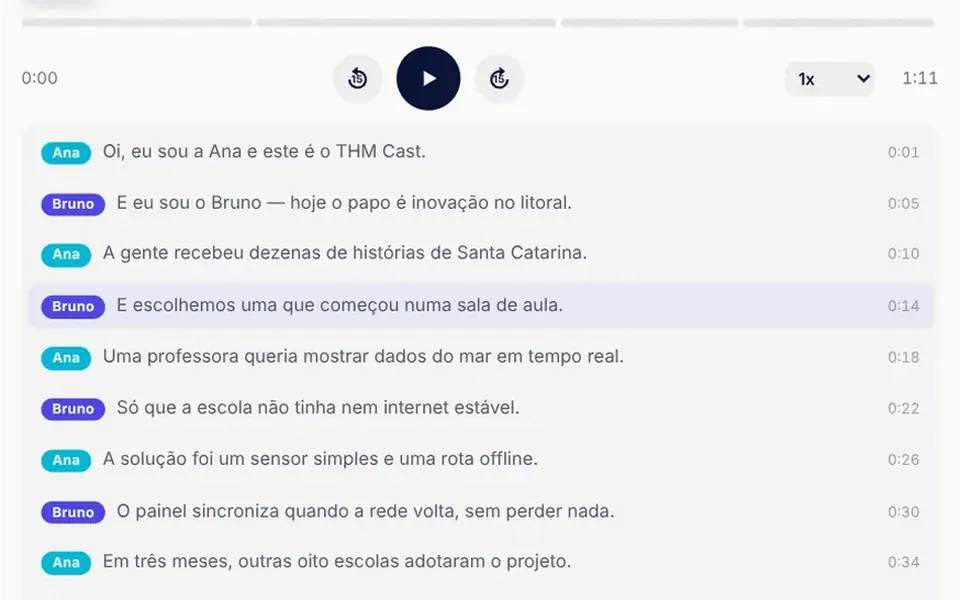
It looks like the player from a podcast app, placed on the page over a light background. At the top sit the square cover, the episode title and subtitle, and a tag showing the current chapter. Below, a thin bar split into segments, one per chapter, fills with an indigo to cyan gradient. Next come the round play button, the 15-second back and forward buttons and the speed selector. At the bottom is the transcript: each line shows the speaker in a colored tag and its start time, and the current line stays highlighted and centered.
You may be looking for this if you asked for something like
- a podcast player where the transcript follows along with the speech
- episode text that highlights the sentence currently playing
- an audio player with chapters marked on the progress bar
- click a line in the transcript and the audio jumps there
- a player like the ones in podcast apps, but on my own site
- put our company podcast on the site with an accessible transcript
Also known as
- podcast player
- audio player
- synced transcript
- interactive transcript
- audio chapters
- episode player
When to use
- An episode page for a company, school or institution podcast
- Spoken summaries and audio descriptions that need text alongside
- A prototype for an audio product before the final files exist
- Accessible content where the transcript must be visible and navigable
When to avoid
- When you need to play a real audio file without adapting the component
- Lists with many episodes on one screen, where a compact player is enough
How to ask your AI
Create a podcast player with a synced transcript: the current line is highlighted and scrolls with the audio, clicking a line jumps there, chapters on the bar, playback speed and 15-second skips. I want keyboard shortcuts, screen reader announcements of the position and no smooth scrolling for reduced motion.
With THM Componentes, you paste the full prompt from the catalog, which already includes this component's source code, and the AI reproduces this exact effect instead of improvising.
Questions about Sarau
Does Sarau play my own audio file?
Not directly. Sarau ships with a demo episode of just over a minute, with two voices synthesized in the browser that mimic the cadence of speech without real words, plus a sample transcript. For a real episode, ask your AI to replace the synthesis with an audio element and load your transcript with the start time of each line.
Does Sarau work with a keyboard and screen readers?
Yes. In Sarau the progress bar acts as a slider that announces time and chapter, the buttons have labels and there are shortcuts: Space plays and pauses, J and L skip back and forward 15 seconds, and the arrow keys on the bar move 5 seconds. The current transcript line is marked for assistive technology.
Does Sarau's transcript scroll by itself?
It does, with the autoScroll prop on, which is the default. Sarau keeps the current line centered while the audio plays and stops following for a few seconds when the listener scrolls the transcript manually. With reduced motion turned on, the jump to the line happens without smooth scrolling.