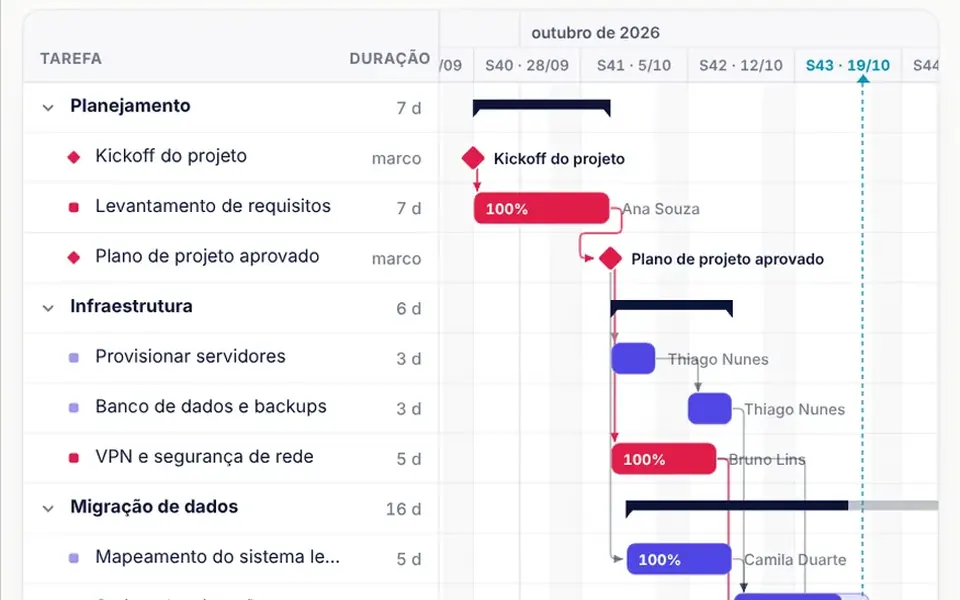
What it looks like
On the left sits the task list, grouped into phases that expand and collapse, with each duration; on the right, the timeline with one bar per task. Bars are light, outlined in the accent color, and fill up with progress, with the percentage inside and the assignee next to them. Arrows connect the end of one task to the start of the next; if a rule is broken, the arrow turns red and dashed. Critical path tasks turn red, milestones show as diamonds and a dashed blue line marks today.
You may be looking for this if you asked for something like
- a project schedule with bars I can drag to change dates
- an MS Project style Gantt chart in the browser, inside my app
- show the rollout stages with deadlines and dependencies
- when one task slips, the following ones move along automatically
- see the project's critical path highlighted on screen
- a construction timeline with phases, milestones and today's date
- a schedule that skips weekends when I drag a task
Also known as
- Gantt chart
- project schedule
- project timeline
- critical path
- dependency chart
- roadmap timeline
When to use
- System rollouts with phases, milestones and cross-team dependencies
- Construction and public projects that must show deadlines and the critical path
- Action plans in ERPs and project management dashboards
- Proposals and reports where the client needs to see and adjust the schedule
When to avoid
- Calendars with holidays or work weeks other than Monday to Friday, which workday snapping does not handle
- Task lists without dates, where a kanban board works better
- Phones as the main screen, since the schedule needs width to read the bars
How to ask your AI
Add a Gantt chart to the projects module of my app: draggable bars that snap to workdays, finish-to-start dependency arrows, automatic rescheduling of the following tasks, a highlighted critical path, collapsible phases, undo and full keyboard editing.
With THM Componentes, you paste the full prompt from the catalog, which already includes this component's source code, and the AI reproduces this exact effect instead of improvising.
Questions about Canteiro
Does Canteiro recalculate dates when a task slips?
Yes. With autoSchedule on, moving or stretching a task in Canteiro pushes every successor and stops any of them from starting before its predecessors end. The critical path is recalculated on the new dates, and the taskChange event reports the edited task and the list of tasks that were pushed.
Can I use Canteiro with the keyboard only?
Yes. In Canteiro, the arrow keys move through the task list and expand or collapse phases, Alt with the arrows moves a task by one workday, Alt and Shift with the arrows change its duration, plus and minus switch the scale and Ctrl+Z undoes. Every change is announced to screen readers.
How do I connect Canteiro to the tasks in my app?
Through v-model: each task has an id, name, start, end, progress, phase, milestone flag, dependencies and assignee. Canteiro fixes duplicate ids and invalid dates, emits taskChange, taskClick, taskOpen and toggle, and exposes methods such as scrollToToday, getCriticalPath and getSlack to your code.