What it looks like
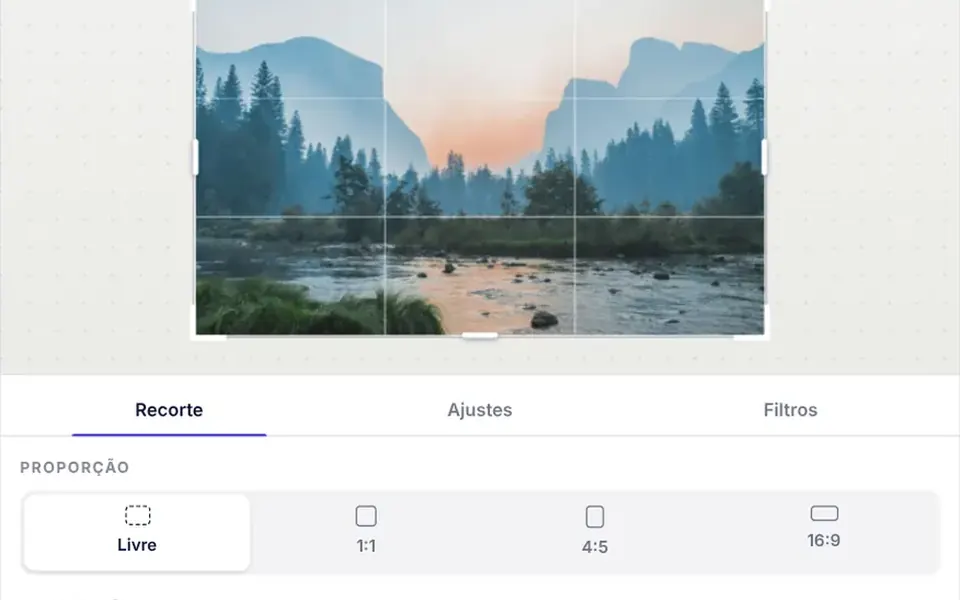
The screen splits between the photo and a panel with three tabs for cropping, adjustments and filters. Over the photo, a white frame with a rule-of-thirds grid and eight handles marks the crop, and everything outside it darkens. Rotating and mirroring come with a short animation. Adjustments are sliders, and seven filter looks plus the original appear as thumbnails made from your own photo. Holding a button shows the original for comparison. When there is room the panel sits beside the photo; in narrower layouts, below it. The export button downloads the file and shows its dimensions and weight.
You may be looking for this if you asked for something like
- crop a profile picture before uploading, like social networks do
- a simple image editor inside my web app
- let users crop a photo to square or 4:5 on my site
- apply an Instagram-style filter before saving the photo
- adjust brightness and contrast of an image inside the app
- rotate and crop a document photo before upload
- edit a post image without leaving the page
Also known as
- image editor
- image cropper
- photo editor
- crop and filter
- photo filters
- in-browser image editing
When to use
- Profile pictures for patients, professionals and customers
- Uploads of document photos, records and receipts
- Creating posts and brand images inside a dashboard
- Product listings in online stores with consistent cropping
When to avoid
- Professional editing with layers, text or retouching, which it does not do
- Images from another domain without CORS enabled, which cannot be edited
- Products for people who do not read Portuguese, since the labels are in Brazilian Portuguese
How to ask your AI
Add an image editor to the profile picture screen: 1:1 crop with handles and keyboard control, rotation, brightness and contrast adjustments, WebGL filter previews with a Canvas 2D fallback, JPEG export, lazy loading and my brand colors.
With THM Componentes, you paste the full prompt from the catalog, which already includes this component's source code, and the AI reproduces this exact effect instead of improvising.
Questions about Prancheta
Does Prancheta upload the photo to a server?
No. Prancheta runs entirely in the browser with no network calls: it opens local files and returns the edited image as a data URL in the export event, with type, width, height and size in bytes. Sending it to your server or storage is up to your code, which your AI can build from that event.
Does Prancheta work without WebGL and on phones?
Yes. Prancheta tries WebGL2, then WebGL1, and falls back to Canvas 2D when neither is available. On phones, the crop handles respond to touch and the panel moves below the photo. Images larger than 4096 px are scaled down on open so they fit the graphics card.
How do I use Prancheta in Nuxt?
The THM Componentes prompt asks your AI to wrap Prancheta in ClientOnly with a static fallback, an image or a color, and to load it on demand, since it relies on canvas and WebGL. The starting image comes from the src prop and must be on the same domain or served with CORS enabled.