What it looks like
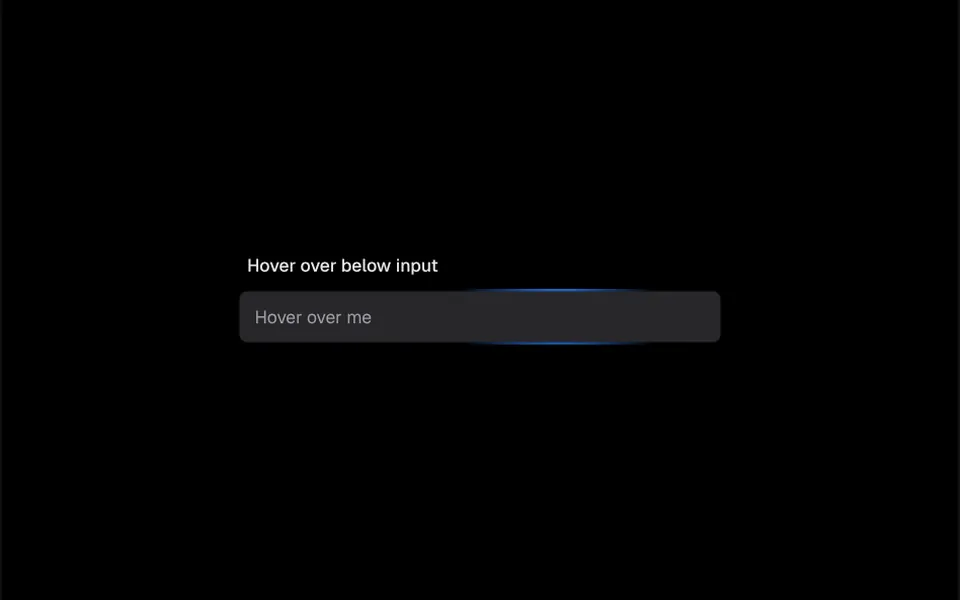
Picture a small flashlight sweeping along the frame of the field. The field is 40 pixels tall, with rounded corners and a very light gray background with a soft shadow; in dark mode the background turns graphite and the text white. When the mouse enters, a circle of blue light with a 100-pixel radius appears on the thin border around the field and follows the cursor with no delay, as if the frame lit up only at that spot. When the mouse leaves, the glow switches off and the field goes back to normal.
You may be looking for this if you asked for something like
- a text field with a light that follows the mouse along the border
- make my login form look like an expensive app
- an input that glows blue when I hover over it
- a field border that lights up wherever the mouse is
- a modern text box for my contact form
- a flashlight effect on the input border, like startup websites have
Also known as
- glow input
- spotlight input
- radial hover input
- cursor-lit text field
- animated text field
When to use
- Contact, login and sign-up forms that should look polished
- A SaaS landing page with a prominent email field
- Dark mode interfaces, where the blue glow stands out more
- Tailwind projects that want a ready-made field with v-model
When to avoid
- Long forms, where a glow on dozens of fields becomes a distraction
- Apps used almost only on phones, since the glow was made for mouse movement
How to ask your AI
Create a text input with a radial glow on its border that follows the cursor, in my brand accent color, for the login form. Keep v-model working, a clearly visible keyboard focus and a version without the effect for people who prefer reduced motion.
With THM Componentes, you paste the full prompt from the catalog together with this component's code, and the AI reproduces this exact effect instead of improvising.
Questions about Tocha
Does Tocha work with v-model and regular input attributes?
Yes. Tocha passes the attributes you put on it, such as type, placeholder, name and required, to the native field, and it accepts v-model or a starting value through the defaultValue prop. That lets it replace a regular input in login, sign-up and contact forms without changing your form logic.
Can I change the blue color of the glow in Tocha?
Yes. The glow in Tocha reads its color from the --blue-500 CSS variable, and the THM Componentes prompt tells your AI to use your project color and typography tokens, with no hard-coded colors inside the component. The light circle and the field background then follow your brand palette.
Does Tocha work on phones?
It works like any field: people tap and type as usual. The glow in Tocha was made for mouse movement, so the effect is limited on phones. The THM Componentes prompt asks for mobile testing and for comparing LCP and INP before and after adding the component.