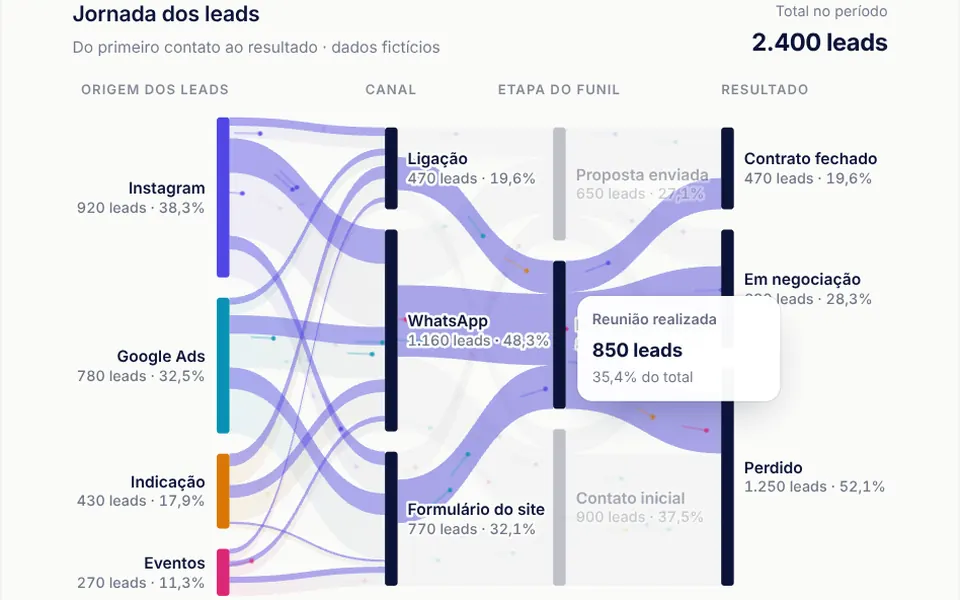
What it looks like
Picture rivers that split and merge: sources sit on the left as colored bars in indigo, cyan, amber and pink, and outcomes sit on the right. Between them run translucent curved bands as wide as each flow, starting in the source color and darkening along the way. Dots with tails, like comets, travel the bands in proportion to the volume, and the diagram reveals itself from left to right as it enters the screen. Hovering a node or a band lights up the whole path, dims the rest and shows a white card with the volume and percentages.
You may be looking for this if you asked for something like
- a diagram showing where leads go at each funnel stage
- a flow chart with bands that split like rivers
- show the patient journey from intake to outcome
- a visual sales funnel with dots moving through the stages
- see where the project money comes from and where it goes
- a path chart that lights up when I hover
Also known as
- Sankey diagram
- flow diagram
- alluvial chart
- funnel flow chart
- particle flow chart
When to use
- A sales funnel with sources, channels, stages and outcomes
- Patient or customer journeys between visits and outcomes
- Accountability reports showing where funds come from and where they go
- Presentations that need to explain drop-off between stages
When to avoid
- Flows with dozens of nodes per column, which turn into a tangle of bands
- Very narrow screens: below 520 pixels the diagram scrolls sideways
- Dark or English-only pages, unless your AI adapts the navy defaults and the Portuguese header and tooltip text
How to ask your AI
Build a Sankey diagram of our sales funnel with bands sized by volume, Canvas particles flowing in the same proportion and full-path highlighting on hover. Use my brand colors, arrow key navigation, pausing when off screen and a version without particles for reduced motion.
With THM Componentes, you paste the full prompt from the catalog, which already includes this component's source code, and the AI reproduces this exact effect instead of improvising.
Questions about Aqueduto
How do I build my funnel in Aqueduto?
Pass the nodes prop with an id and label for each step and the links prop with the source, target and value of each flow. Aqueduto works out the columns from depth, orders nodes to reduce crossings and uses the columns prop for headings; the unit prop sets the word shown in labels.
Is Aqueduto heavy on the page?
It is rated Medium in THM Componentes. Aqueduto's bands are SVG and only the particles use Canvas, capped at 420 at a time; the animation stops when the diagram leaves the screen, and the particles prop turns the dots off if you only want the diagram.
Does Aqueduto respect reduced motion settings?
Yes. With reduced motion on, Aqueduto appears all at once, with no left-to-right reveal and no particles, and path highlights switch without transitions. Reading by mouse, arrow keys and the hidden table for screen readers stays the same.