What it looks like
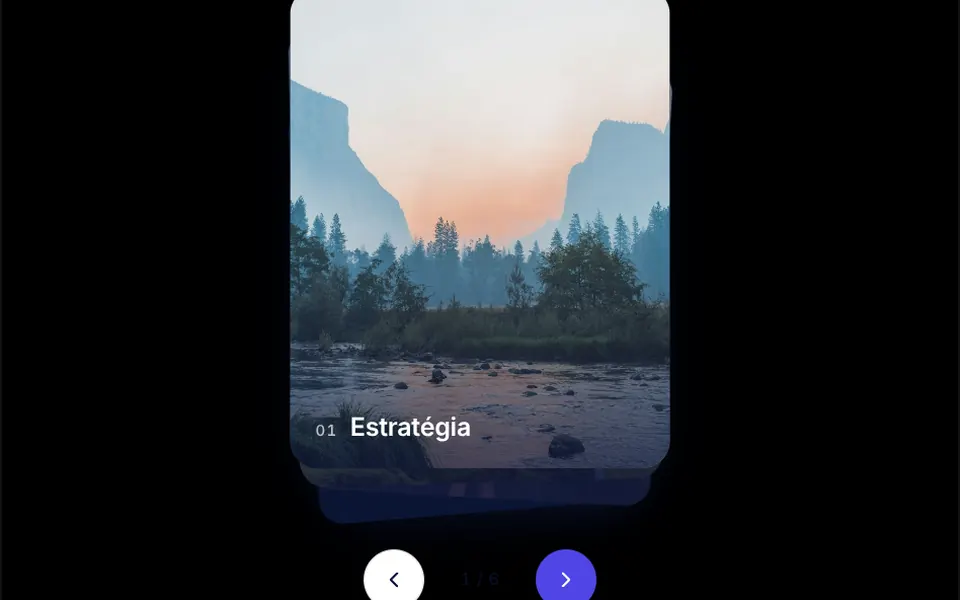
It looks like a deck of photos on a table. The front card shows the full image with a dark fade at the bottom, a number and a caption; the cards behind sit slightly lower, smaller, tilted a little to alternating sides and darker. Drag the top card and it rotates toward your gesture. Let go past a certain distance or with a quick flick and it flies off, then reappears at the back of the pile, settling with a slight wobble; let go earlier and it returns to the center. Two round buttons and a counter sit below.
You may be looking for this if you asked for something like
- cards I can swipe left and right like a dating app
- a stack of photos you can flick away with your finger
- show testimonials one at a time by swiping like a deck of cards
- a case study gallery as stacked cards on mobile
- cards that spring back when I let go after dragging
- swipe through cards during app onboarding
- that Tinder-style card swipe for my website
Also known as
- swipe cards
- swipeable card deck
- stacked cards
- draggable cards
- card swipe gesture
- springy card pile
When to use
- Testimonials or case studies shown one at a time on a sales page
- Mobile app onboarding with one idea per card
- A compact showcase of plans, products or portfolio pieces
- Touch-first areas, where swiping feels more natural than clicking
When to avoid
- Content people need to compare side by side, such as pricing tables
- Long lists: after many cards, hardly anyone reaches the end of the stack
How to ask your AI
Create a swipeable stack of draggable cards for the homepage testimonials: the top card tilts while dragged, is flung by velocity and springs back to the bottom, with arrow key navigation, screen reader announcements and instant changes without animation for reduced motion.
With THM Componentes, you paste the full prompt from the catalog, which already includes this component's source code, and the AI reproduces this exact effect instead of improvising.
Questions about Truco
Does Truco work on phones?
Yes. Truco handles mouse and finger with the same pointer events, and the card turns off browser scrolling during the gesture, so you can drag and fling it with your finger without the page scrolling along. On small screens, adjust the card width and height through props; the default is 300 by 380 pixels.
Can Truco be used with only a keyboard and a screen reader?
Yes. Truco's deck takes focus and passes cards with the left and right arrow keys, and the two buttons below do the same. On every change, a hidden live region tells screen readers which card is in front, with its number and caption. Those built-in labels are in Portuguese, so ask your AI to translate them.
How does Truco behave with reduced motion?
When reduced motion is turned on, Truco switches off its springs: the passed card goes straight to the back of the pile and the others take their places without wobbling. Dragging, buttons and the keyboard keep working as usual.