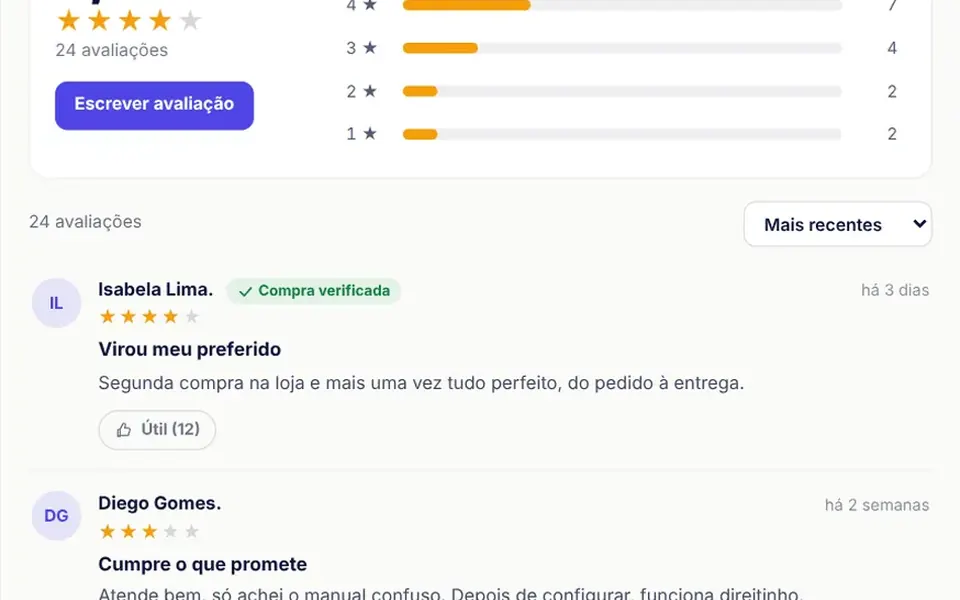
What it looks like
A white panel shows the average rating in large type next to five amber stars filled to the exact fraction, the total and a button to write a review; beside it, five amber bars from 5 to 1 star grow when the block enters the screen. Clicking a bar filters the list by that rating. Each review below shows initials in a circle, a name, a green verified purchase badge when it applies, a relative date, stars, a title, the text and a helpful button with a counter. A dropdown sorts the list. The demo uses fictional reviews marked with a badge.
You may be looking for this if you asked for something like
- show customer reviews with stars on the product page
- an average rating with stars and a bar for each rating
- filter reviews by number of stars
- let customers write a review on my site
- a reviews section like the big marketplaces have
- a helpful button on reviews and a verified purchase badge
- social proof with real reviews for my store
- sort reviews by newest or highest rating
Also known as
- product reviews
- star rating
- review section
- rating summary
- customer reviews
- social proof
- rating histogram
When to use
- Online store product pages that already collect buyer reviews
- Landing pages that show the real rating of a product or service
- Marketplaces and catalogs where the rating breakdown helps people decide
- Stores that want to collect reviews right on the site
When to avoid
- Stores with no real reviews yet, since the sample texts must never pass as customer reviews
- A production form without a backend, since a new review only appears on screen and is not saved
- English interfaces as is, since labels and relative dates are in Brazilian Portuguese
How to ask your AI
Build a reviews block for my product page that shows my store's real reviews: an average with fractional stars, rating bars that filter the list, sorting, a helpful button, a verified purchase badge, a keyboard accessible form and submission to my API.
With THM Componentes, you paste the full prompt from the catalog, which already includes this component's source code, and the AI reproduces this exact effect instead of improvising.
Questions about Veredito
How do I show my customers' real reviews in Veredito?
Pass the reviews prop with the reviews you already collect, each with a name, rating, title, text, date, whether the purchase was verified and its helpful votes. Veredito computes the average, breakdown and filters from them. Without the prop, it shows a fictional list, only for testing the layout; with real data, remove the demo badge from the header.
Does Veredito's form save new reviews?
Not on its own. Veredito's form checks for a rating from 1 to 5 and a text of at least 10 characters, places the new review at the top of the list on screen and emits submitReview with the data. Saving, moderating and publishing are up to your backend; the helpful button also just emits an event.
Is Veredito accessible by keyboard and screen readers?
Yes. In Veredito, the form stars are a radio group you pick with the arrow keys, each rating bar is a button that announces stars, count and percentage, the average has a text alternative and sorting uses a native select. With reduced motion, the bars appear full without animating.