What it looks like
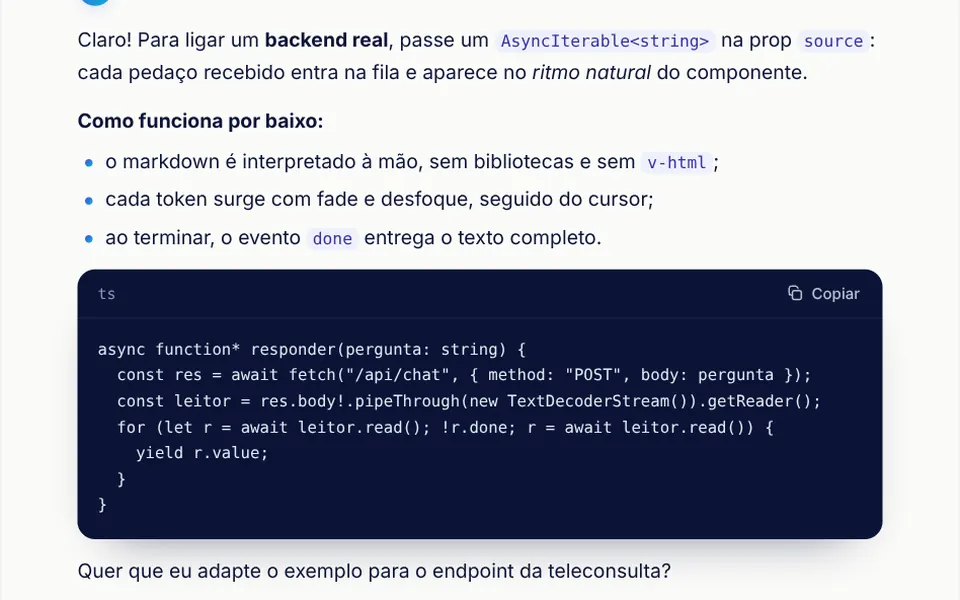
It looks like a chatbot reply being written in front of you. At the top, a small round avatar with an indigo to cyan gradient and a star sits next to the assistant name and a status line that shimmers while text arrives, then shows how long it took. Words appear one at a time out of a soft blur, at an uneven pace: short pauses at commas, longer ones at periods and the odd burst. A thin gradient cursor blinks at the end. Bold text, lists and code arrive already formatted, and code blocks get a navy background and a copy button.
You may be looking for this if you asked for something like
- an AI answer that shows up word by word in my chat
- text that types itself out the way ChatGPT does
- a typewriter effect for my virtual assistant replies
- show the language model response arriving in real time
- a blinking cursor while the AI is writing
- an AI chat reply with code blocks and a copy button
- make my assistant feel like a real AI app
- render markdown as the answer streams in from the server
Also known as
- streaming text
- token streaming
- AI typing effect
- LLM streaming UI
- streaming markdown
- typewriter effect
- chat response renderer
When to use
- Support, triage and help desk chats with AI-generated answers
- Copilots inside SaaS products that explain steps and show code snippets
- AI product demos, with the reply simulated from a fixed text
- Screens that receive long answers from the server and need to show progress
When to avoid
- Replies with tables, links or images, which the markdown parser does not handle
- Dark interfaces unless you adjust the colors, since the text comes in navy
- English-only products, unless your AI translates the built-in Portuguese labels
How to ask your AI
Build a streaming AI answer component for my chat: text revealed token by token with a fade and blur, a blinking cursor, markdown with code blocks and a copy button, stop and regenerate buttons, reading a stream from my backend, and no animation for reduced motion.
With THM Componentes, you paste the full prompt from the catalog, which already includes this component's source code, and the AI reproduces this exact effect instead of improvising.
Questions about Prosa
How do I connect Prosa to a streaming response from my backend?
Pass an async iterable of strings in the source prop, such as an async generator that reads a fetch response body. Prosa queues each chunk, holds the last word until a space arrives, speeds up when the queue grows and emits done, stop or error. Without source, it simulates streaming from the text prop.
Which markdown does Prosa understand?
Prosa handles paragraphs, headings, bold, italic, inline code, bulleted and numbered lists and fenced code blocks, using its own parser and no v-html, so every piece of text is rendered as escaped text. Links, tables and images show up as plain text. Each code block shows its language name and a copy button.
Does Prosa respect reduced motion settings?
Yes. With reduced motion turned on, Prosa drops the per-word fade and blur and stops the cursor blink and the status shimmer. Simulated text appears all at once, and real streamed text appears in chunks as it arrives. When it scrolls off screen, the simulation pauses.