What it looks like
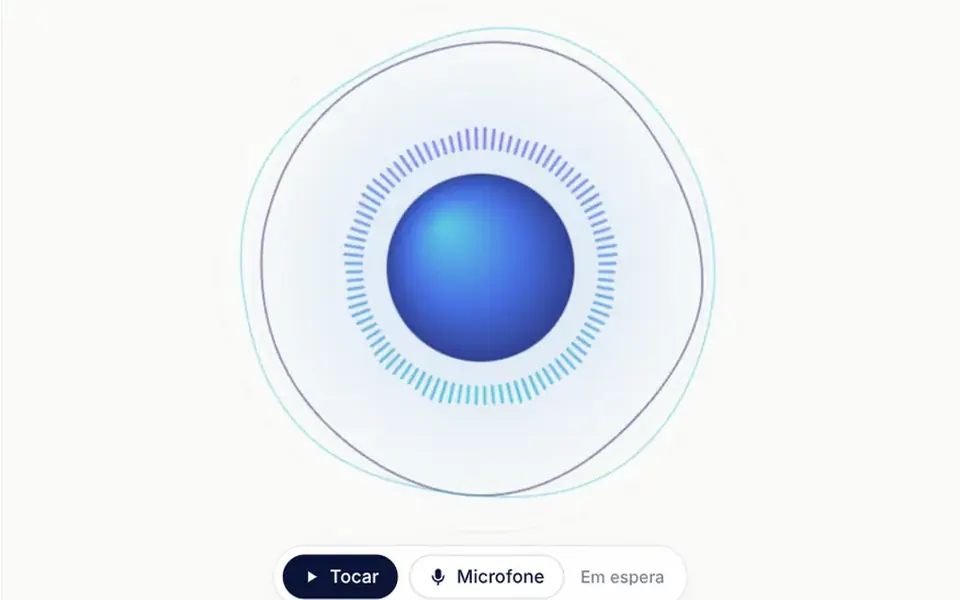
It looks like a soap bubble filled with colored clouds, floating in the middle. Inside, indigo and cyan waves swirl slowly and thin threads of light cross the surface; the rim glows with lilac and sky blue reflections, and a white highlight sits at the top left. While idle, the sphere breathes. Listening, its outline ripples with the volume and thin rings appear around it. Thinking, the inside twists into a whirl and a comet of light circles the rim. Speaking, it pulses and sends out rings in time with the voice. Below, a label with a colored dot names the state, and the background stays transparent.
You may be looking for this if you asked for something like
- that orb that moves while the AI is talking
- an animated sphere for my voice assistant
- an animation that reacts to the microphone while someone speaks
- show that the AI is listening, thinking or answering
- a glowing orb like Siri for my app
- a voice indicator for an AI telehealth app
- make my voice support line look like a real AI product
- a circle that pulses with the synthesized voice
Also known as
- AI assistant orb
- AI voice visualizer
- audio reactive orb
- voice assistant animation
- speaking indicator
- listening indicator
- voice activity orb
When to use
- Voice assistants in telehealth, teletherapy and customer support
- Simulators and training tools where people talk to an AI by voice
- AI call screens that need to show who is speaking
- AI product openers where the orb is the centerpiece
When to avoid
- Pages that already run another WebGL effect
- Dark backgrounds unless you adjust the labels, which come in navy
- English interfaces as is, since the mic button and its messages are in Portuguese
How to ask your AI
Create a WebGL voice orb for my AI assistant with idle, listening, thinking and speaking states, reacting to the audio level from the microphone or the synthesized voice, in my brand colors, with a still frame for reduced motion and a CSS fallback without WebGL.
With THM Componentes, you paste the full prompt from the catalog, which already includes this component's source code, and the AI reproduces this exact effect instead of improvising.
Questions about Sopro
How do I make Sopro react to the AI voice?
Set the state prop to speaking and send the synthesized audio level, from 0 to 1, in the level prop, measured in your own player. For the user's voice, turn on useMic: Sopro shows a mic button and measures the volume itself. Without either, it simulates a voice with syllables and pauses while listening or speaking.
Does Sopro work on phones and without WebGL?
Yes. Sopro tries WebGL2, then WebGL1, and without either it shows a CSS gradient sphere that breathes and grows with the sound. It caps pixel density at 2 and pauses off screen. The microphone only works over HTTPS, and permission messages are in Brazilian Portuguese.
Does Sopro respect reduced motion settings?
Yes. With reduced motion on, Sopro draws a still frame for each state and redraws only when the state changes; the label dot stops pulsing and the label swap becomes a simple fade. The demo auto cycle keeps going, at a slower pace.