What it looks like
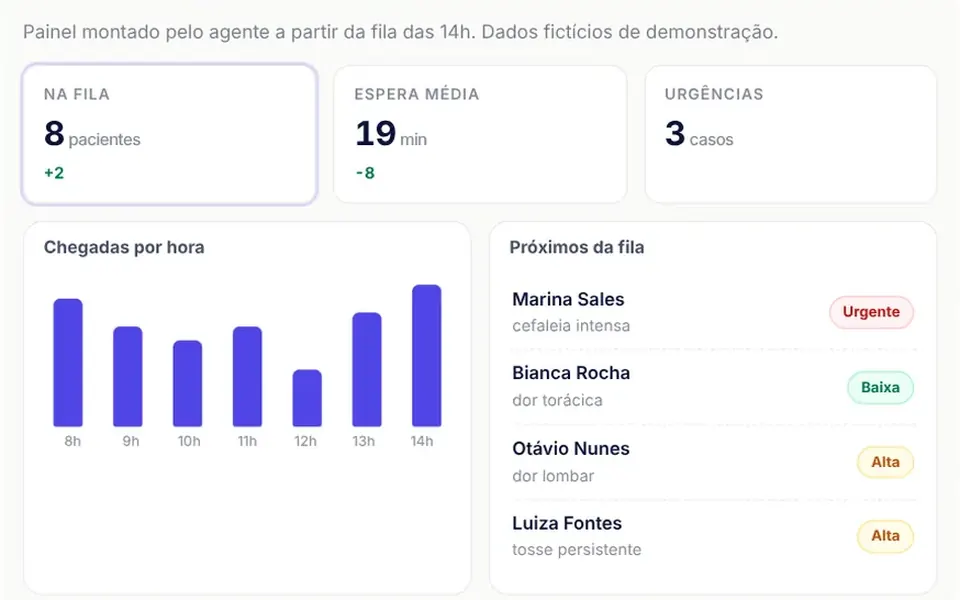
It feels like watching someone assemble a dashboard live, block by block. In a light card, the header has a dot that pulses while the agent works, the title and a status. Pieces appear one by one, rising slightly out of a blur: a heading, three metrics with their change in green or red, a bar chart that grows, a list with priority tags, a form and buttons. When the agent updates a number, that block flashes with an outline in the accent color. At the bottom, a collapsible panel lists the actions fired. In the demo, the panel is a clinic triage board.
You may be looking for this if you asked for something like
- let the AI build the screen instead of answering with plain text
- a chatbot that replies with charts, forms and buttons instead of paragraphs
- a dashboard that appears piece by piece while the agent generates it
- turn the agent's JSON response into components on screen
- an on-demand dashboard created by AI inside my product
- that AI-built interface where cards pop in one by one
- safely render the interface the AI model comes up with
Also known as
- AI-generated interface
- agent UI
- JSON to UI
- server-driven UI
- streaming UI
- UI renderer
- dynamic UI from JSON
When to use
- Agents and MCP apps that build dashboards, forms and reports on demand
- Copilots that answer with metrics and charts instead of paragraphs
- Internal assistants that collect data through forms generated on the spot
- Prototyping AI-built interfaces before you settle the final component catalog
When to avoid
- Fixed screens that never change, where a regular component is simpler to maintain
- Showing images from any address, since only paths starting with /thm/ are accepted without changes
- English interfaces as is, since built-in labels and warnings are in Portuguese
How to ask your AI
Create a generative UI renderer in my brand colors: the agent streams JSON with headings, metrics, cards, lists, validated forms, charts and buttons, the interface assembles live, unknown types never break the screen and every click sends a named action back to the agent.
With THM Componentes, you paste the full prompt from the catalog, which already includes this component's source code, and the AI reproduces this exact effect instead of improvising.
Questions about Quebra-cabeça
How does the agent talk to Quebra-cabeça?
The agent sends NDJSON, one operation per line: add to create a block with an id and parent, update to change fields, remove, clear and done. You pass that stream in the source prop, or a ready tree in the spec prop. Quebra-cabeça emits action with a name and context for every clicked button or submitted form.
Is Quebra-cabeça safe with unpredictable AI output?
It is defensive. Quebra-cabeça validates every block: an unknown type becomes a discreet warning, an invalid field is normalized and logged as an issue, and nothing brings the panel down. It uses no v-html, and images are only accepted from paths that start with /thm/, so the agent cannot load external addresses.
Which blocks can Quebra-cabeça draw?
Quebra-cabeça's catalog has 11 types: heading, text, metric, card, row, column, list, form, chart, image and actions. Forms accept text, number, select, checkbox and textarea fields, with required, minimum and maximum rules, and charts can be bars or a line.