What it looks like
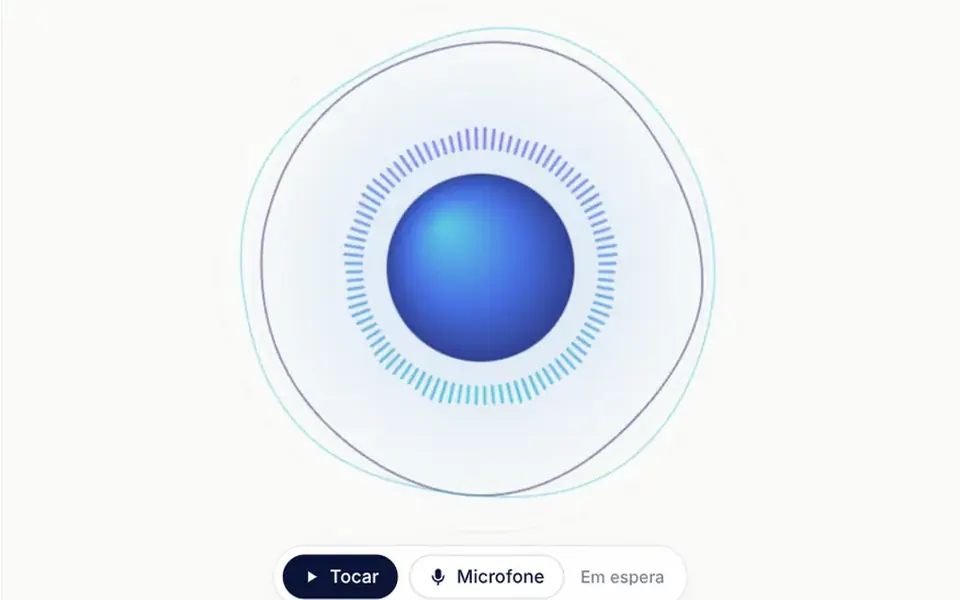
In radial mode, a disc with an indigo and cyan gradient pulses in the center, surrounded by a halo and by mirrored bars that grow with the sound frequencies, from low to high. Two thin rings ripple around it, turning slowly in opposite directions. In wave mode, seven lines cross the screen like ribbons and move most in the middle. Without sound, everything breathes gently. At the bottom, a pill holds the play and microphone buttons and a status line. The synthesized sound is a soft chord with scattered notes and echo.
You may be looking for this if you asked for something like
- bars that move with the sound for my podcast page
- that circle that pulses with the music, like a radio player
- a sound visualizer that works with the visitor's microphone
- animated waves that react to voice for a meditation app
- a round equalizer effect around a disc
- show sound visually on the event page
Also known as
- audio-reactive bars
- sound visualizer
- music visualizer
- audio spectrum
- animated equalizer
- radial visualizer
When to use
- A podcast, radio show or music release page
- Voice, meditation or wellness products that use ambient sound
- An event or festival opener with a sound piece
- A microphone check before a recording or a call
When to avoid
- When sound is not part of the offer and the visual becomes mere decoration
- Sites served without HTTPS, where the microphone is unavailable
How to ask your AI
Create a Canvas 2D audio visualizer with radial bars around a pulsing disc and a wave mode, reacting to ambient sound that only plays after a click or to the microphone, with clear permission messages, my brand colors and a still frame for reduced motion.
With THM Componentes, you paste the full prompt from the catalog, which already includes this component's source code, and the AI reproduces this exact effect instead of improvising.
Questions about Pandeiro
Does Pandeiro play sound on its own?
No. Pandeiro only creates the ambient sound after the person clicks play, with volume rising over a little more than two seconds. The microphone is also turned on only by its button, and the component shows a message when permission is denied, when there is no microphone or when the page is not on HTTPS. Those messages are in Brazilian Portuguese.
Does Pandeiro respect reduced motion settings?
Yes. With reduced motion on and no sound playing, Pandeiro freezes its idle animation and shows a still frame. When the person turns on the sound or the microphone, the bars react to the audio again. Drawing also stops when the component leaves the screen.
Does the microphone in Pandeiro record or send my voice?
There is no recording or upload in the code. Pandeiro connects the microphone to a frequency analyzer only to draw the bars, without playing the voice through the speakers, and releases access when the person clicks stop or when the component leaves the page.